v5.9.0MinorReleased

Brand New AI Email Categorization, Static Profiles, Interactive Help, Improved Online Forms, Filter Presets, Forecast and other Various Improvements…

Coevera 5.9.0 leads with Voyager AI › Email Categorization, which automatically tags captured emails and analyzes sentiment, and adds a WhatsApp messaging integration, Static Profiles, Interactive Help, multi-column Online Forms, Feeds filter presets, and Forecast improvements.

Voyager AIEmailIntegrations
Share
Features
8
Improvements
4
Security
Próximamente

Overview

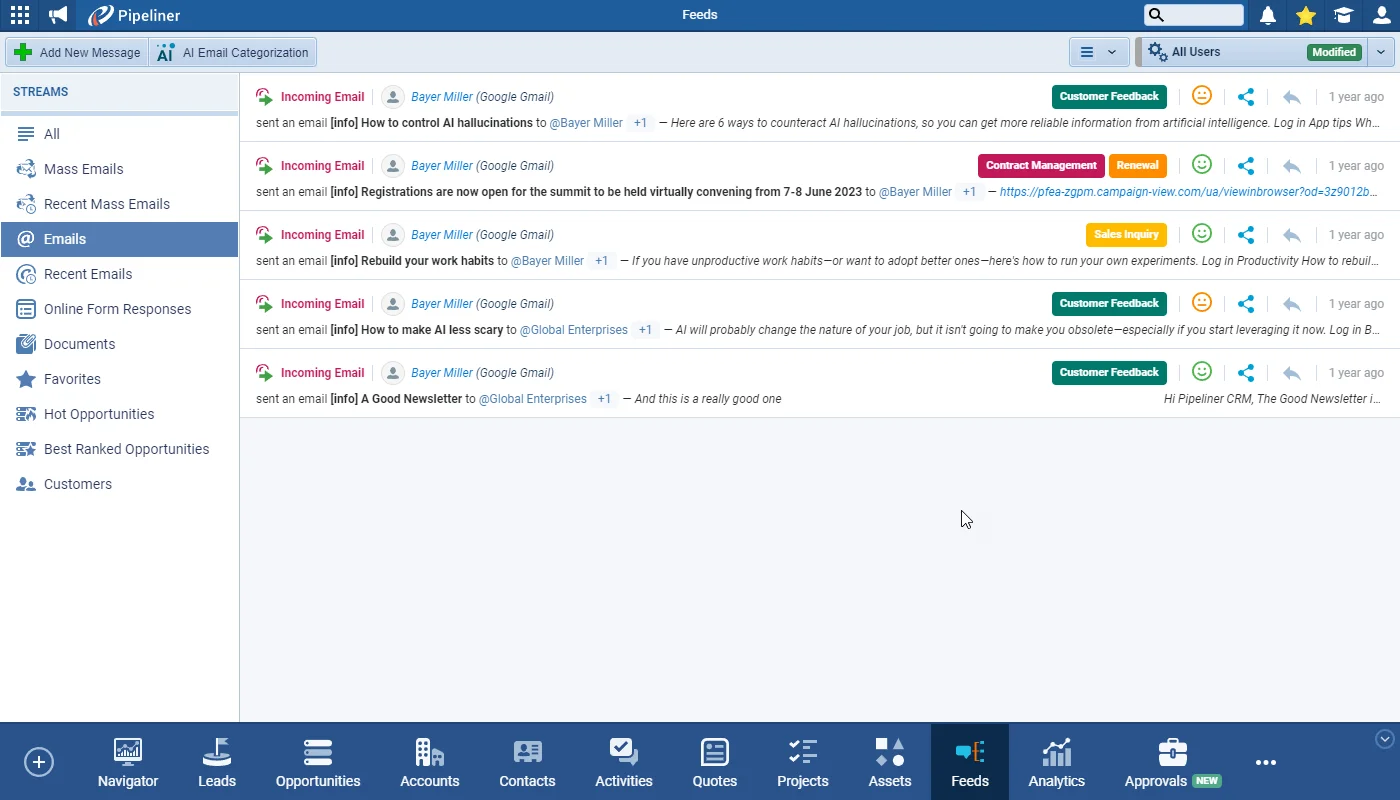
The headline of 5.9.0 is Voyager AI › Email Categorization: Coevera can now automatically categorize the emails it captures, applying Tags from a predefined, admin-managed set and analyzing Sentiment so the current state of play on a Contact or Account is visible at a glance. Tags and Sentiment show in the main and per-record Feeds and in email detail, can be filtered and edited manually, and are exposed as three new fields — Email Tags, Email Sentiment, and Email Direction — for columns, grouping, filtering, and charts. Automatic categorization is enabled from the Voyager AI Assistant module in the Automation Hub, and only new incoming emails from the 5.9 release date are processed automatically.

Elsewhere, a WhatsApp messaging integrationa paid add-on for all subscription tiers, activated from the Automation Hub — lets teams connect company and personal WhatsApp accounts, control access by User Role, and track conversations in Feeds. Static Profiles add user-curated record lists that stay fixed until edited; the Online Form editor gains multi-column containers with drag-and-drop reordering; Filter Presets let users save and switch filter sets in record Feeds tabs; and a new Interactive Help tool surfaces context-relevant clickable demos throughout the app. Forecast Improvements add an 'Allowed editing not owned records' permission and a tracked history of forecast value changes, Email Sequence tasks can now trigger Automatizer processes, and smaller updates cover space-wide email-notification control, editing records owned by inactive users, report filtering, and dashboard display.

What's in this release
  • Voyager AI › Email Categorization automatically sets Tags and analyzes Sentiment on captured emails.
  • Email Tags come from a predefined, admin-managed set, and only new incoming emails from the 5.9 release date are categorized automatically.
  • Tags and Sentiment appear in the main and per-record Feeds and in email detail, and can be filtered and edited manually.
  • Three new fields — Email Tags, Email Sentiment, and Email Direction — support visible columns, grouping, filtering, and charts.
  • An AI Email Categorization action processes incoming emails by custom selection, the last 7 days, or the last 30 days.
  • A new WhatsApp messaging integration, a paid add-on for all subscription tiers, is activated from the Automation Hub.
  • Company and personal WhatsApp accounts can be added with per-User-Role access control, and conversations are tracked in Feeds.
  • Static Profiles let users build custom record lists that stay fixed until manually changed.
  • The Online Form editor adds multi-column containers with drag-and-drop reordering of fields and containers.
  • Filter Presets in record Feeds tabs let users create, rename, delete, and switch saved filter sets shared across all entities.
  • Interactive Help provides context-relevant clickable demos, reachable from the lightbulb icon anywhere it appears.
  • Forecast Improvements add an 'Allowed editing not owned records' permission and a tracked history of forecast value changes.
  • Email Sequence tasks can now trigger a compatible Automatizer process when a task is created.
  • Admins can disable or enable all email notifications space-wide, reports gain a filter box, and dashboards show only when they contain a matching report.
Voyager AI › Email Categorization

What we're proud of

Your inbox, automatically categorized

Voyager AI › Email Categorization tags captured emails and scores their sentiment against a predefined, admin-managed tag set, so the current state of play on any Contact or Account is visible at a glance. The new Email Tags, Email Sentiment, and Email Direction fields can be filtered, grouped, reported, and charted, and users can reprocess the last 7 or 30 days of incoming email on demand.

01New · Voyager AI

Voyager AI › Email Categorization

Voyager AI › Email Categorization

Voyager AI now includes the ability to automatically categorize emails captured in Coevera to set Tags and analyze Sentiment. As well as allowing instant visibility of the current “state of play” of a Contact or Account, users can also filter records based on current Sentiment or applied Tags allowing them to respond appropriately and can also create reports and analyze records.

All screenshots

9
Documentation#voyager-ai-email-categorization

02New · Integrations

WhatsApp Messaging Integration

WhatsApp Messaging Integration

WhatsApp is increasingly used by businesses as a way to keep in touch with customers and to quickly answer queries. Available as a paid-for add-on for all subscription tiers, the WhatsApp integration can be activated from the "Automation Hub" and, once the Terms & Conditions have been accepted and the add-on is running, personal and business WhatsApp accounts can be added to Coevera and used to create new conversations and track previous conversations from the Feeds tab.

All screenshots

13
Documentation#whatsapp-messaging-integration
03New · Pipeline

Static Profiles (Static Lists)

Static Profiles (Static Lists)

Static Profiles allows users to create a custom list of records which then remains static unless changed by the user. This is ideal for invitations and follow ups where you need to contact the same people on an ongoing basis and where a dynamic filter might have altered, changing the records displayed by a dynamic profile. Static Profiles are created from the main menu — users can…

“Add to New” › Add selected record(s) to a new static profile (or create a new empty static profile)

“Add to Existing” › Add selected record(s) to an existing static profile

All screenshots

2
Documentation#static-profiles-static-lists
04New · Integrations

Interactive Help

Interactive Help

Our new Interactive Help tool is designed to help make Coevera even easier to use.

When a user clicks on the “Explore Interactively” button, they will be able to access a series of interactive demos that are directly relevant to the area of Coevera that they are working in.

Clicking the name of the demo will open a preview image.

All screenshots

6
Documentation#interactive-help
05New · Integrations

Online Forms › Multiple Questions in One Row

Online Forms › Multiple Questions in One Row

This release includes a significant update to the Online Form Editor making it easier to design dynamic and flexible forms. Users can now add multi-column containers.

All screenshots

4
Documentation#online-forms-multiple-questions-in-one-row
06New · Pipeline

Filter Presets in Feeds Tab

Filter Presets in Feeds Tab

We have added “Filter Presets” to the “Filter” in Feeds tabs on records. This useful enhancement allows users to create their own Preset filters and quickly switch between them to find relevant Feeds without needing to check / uncheck options in the Filter. These new “Filter Presets” are shared across all entities.

There’s a new bar at the top of the the Filter window where users can:

See what “Filter Preset” is currently selected.

All screenshots

2
Documentation#filter-presets-in-feeds-tab
07New · Reports

Forecast Improvements

Forecast Improvements

To facilitate working with Forecasts, we’ve added an additional permission to “Common Records › Forecasts” within “User Role” settings. Enable “Allowed editing not owned records” to allow users based on the role to edit all forecast values within visible forecasts even if they did not create (own) the forecast.

All screenshots

3
Documentation#forecast-improvements
08New · Automatizer

Triggering Processes From Email Sequences

Triggering Processes From Email Sequences

As part of the “Settings” for “Email Sequences“, tasks can be created when the recipient performs certain actions such as replying or unsubscribing. These tasks can now trigger an Automatizer process to directly connect “Email Sequences” with processes to cover scenarios such as.

Running additional workflows for the created task within the email sequence.

Creating leads when the task was created by the email sequence.

All screenshots

2
Documentation#triggering-processes-from-email-sequences

Various Improvements

As part of our ongoing usability enhancement program, we’ve updated the following features.

Various ImprovementsAdministration

Administration › Disable/Enable Email Notifications in Space

Administration › Disable/Enable Email Notifications in Space

A new option has been added to allow Admins to temporarily, or permanently, disable (or enable) all email notifications within their space for new users. The setting can also be applied to existing users by selecting the preferred option and then clicking on the “Apply to all users” button. This option is very useful if you’re importing data and don’t want all your users to receive many notifications prompted by the new records or when running processes that make ownership changes.

#administration-disable-enable-email-notifications-in-space
Various ImprovementsAdministration

Record Update Allowed for Inactive Users

We’ve removed the restriction where a record could not be updated if it was currently owned by an Inactive user.

#record-update-allowed-for-inactive-users
Various ImprovementsReports

Filtering Reports

Filtering Reports

We’ve introduced a new filter box to make finding specific reports quicker and easier. The options include:

  • a “Period” dropdown to filter reports by their creation date, using the same period options as in activity feeds.
  • a “Record Type” dropdown to filter by all available record types
  • Users can now filter records by owner:
    • All(Default)
    • Me Only
    • Selected Owner

Recently Viewed” & “Favorites” are retained regardless of the selection.

#filtering-reports
Various ImprovementsReports

Dashboard Filtering Update

Dashboards will only be displayed if they contain at least one report that matches the filtered criteria.

#dashboard-filtering-update

Frequently Asked Questions

It automatically categorizes emails captured in Coevera, applying Tags from a predefined set and analyzing Sentiment, so you can see the current state of a Contact or Account, filter records, and build reports on email activity.

Only new incoming emails from the 5.9 release date onward are processed automatically. You can also run the AI Email Categorization action on a custom selection or on incoming email from the last 7 or 30 days, and set Tags and Sentiment manually at any time.

WhatsApp is a paid-for add-on available on all subscription tiers. A Coevera Admin activates it from the Automation Hub after accepting the WhatsApp and Unipile terms, then company or personal WhatsApp accounts can be connected and access controlled per User Role.

Static Profiles are user-created lists of records that stay fixed until you change them — useful for invitations or follow-ups with the same people over time, where a dynamic filter might otherwise alter the list. They support List View only, and their Role and Filter tabs cannot be modified after creation.

In a record's Feeds tab you can create, rename, delete, and switch between saved filter presets, which are shared across all entities. This option is currently available for record Feed tabs only, not the main Feeds menu.

A new 'Allowed editing not owned records' permission under User Roles lets users edit all forecast values in visible forecasts they do not own. Coevera also now tracks forecast value changes — who changed a value, when, and the former and new amounts — shown with per-period indicators and tooltips.

Put 5.9.0 to work

Start a free trial and see Voyager AI email categorization, WhatsApp messaging, and the rest of Coevera 5.9.0 in your own pipeline.

No se requiere tarjeta de crédito · Prueba gratuita de 14 días

groupsTrusted by clients around the globeverified_userISO 27001 CertifiedshieldGDPR CompliantblockData never used to train AI