v3.0.0MajorReleased

Brand new Automatizer, Improved Change log, Emailing to contacts/accounts internal users more efficiently and more

Coevera 3.0.0 introduces Automatizer, our point-and-click automation tool for graphically building your organization's processes into Coevera, alongside enhanced Audit Log change tracking, faster email address lookup, and a batch of administration and workflow improvements.

AutomatizerEmailAdministration
Share
Features
4
Improvements
8
Security
Demnächst verfügbar

Overview

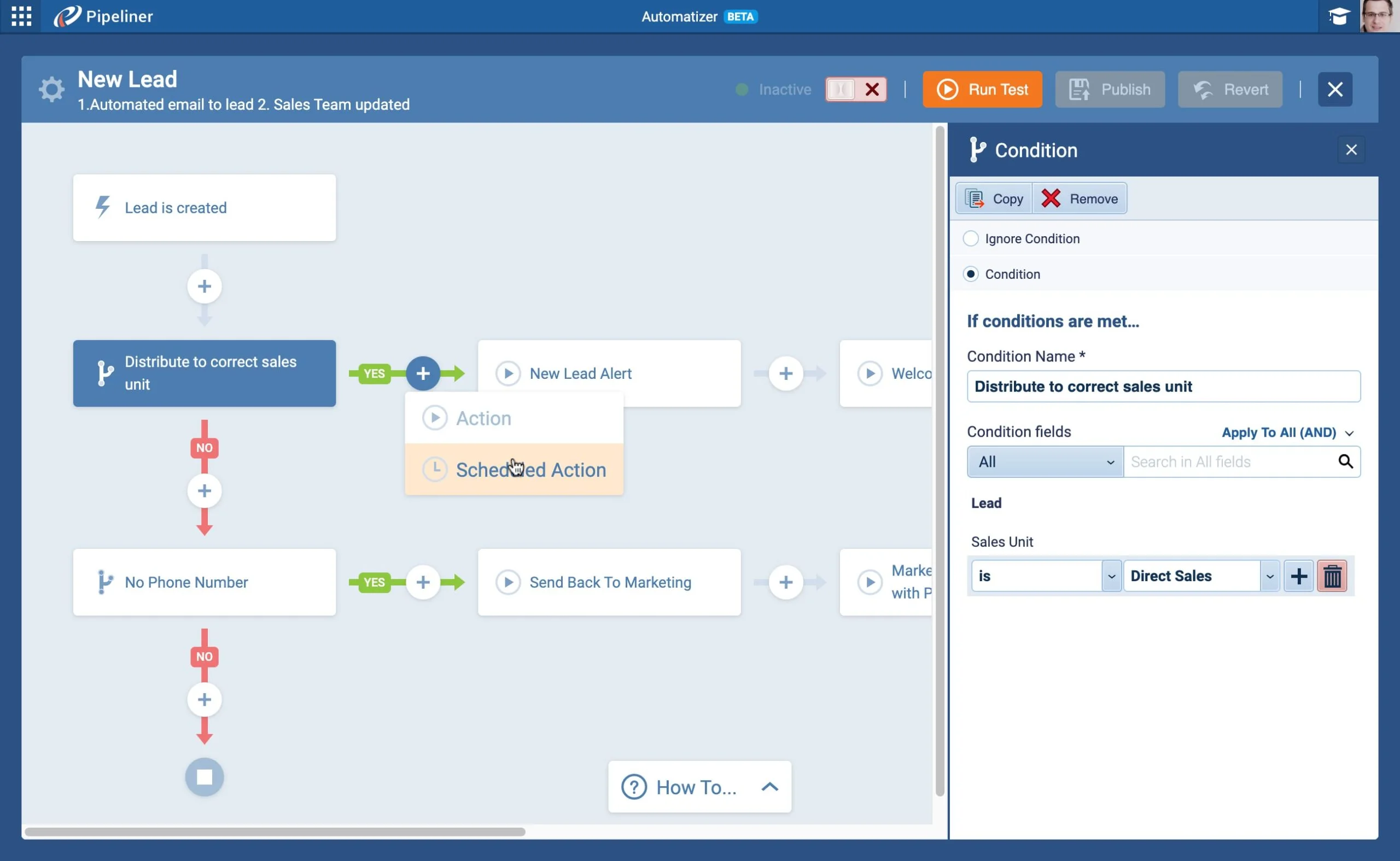
The headline of this release is Automatizer — Coevera's point-and-click automation tool. It lets you graphically build your organization's processes into Coevera with no complex language or coding required, streamlining workflows and automating repetitive tasks and communications for your teams. Every process is built from triggers, if/then conditions, and one or more actions, while your Coevera Admins control which users can add processes and whether each process is private to its owner or applies to all users of the space. The Process Manager lists every process — active or inactive — for detailed status monitoring, and Automatizer will also soon work via third-party integrations.

This release also enhances Audit Log capabilities for Enterprise customers: a new View Changes button on the record Detail screen shows every change made to a record, and admins can export entity changes to Excel or CSV by user, entity, and period from the new Export Entity Changes tab. Sending email from Coevera now searches across Account, Contact, and User email addresses as you type, the Admin Module gains a User-created date field and Auto number fields in Global Search, and a batch of improvements refines merging, the Navigator, notifications, and document emailing.

What's in this release
  • Automatizer, Coevera's point-and-click automation tool, lets you graphically build your organization's processes with no complex language or coding required.
  • Every Automatizer process consists of triggers, if/then conditions, and one or more actions.
  • Coevera Admins control which users can add processes and whether each process is private to its owner or applies to all users of the space.
  • The Process Manager shows all processes — active or inactive — with detailed status monitoring.
  • A new View Changes button on the record Detail screen displays all changes made to a record.
  • Record changes can be exported to an Excel spreadsheet or CSV file for users with export rights.
  • Admins can export all web-app record changes from the new Export Entity Changes tab, choosing users, entities, and period.
  • The Send Email feature now searches Account, Contact, and User email addresses as you start typing.
  • The Admin Module adds a User-created date field in the Users tab showing when each user was added to Coevera.
  • Admins can include Auto number custom fields in Global Search, so users can search by the generated number.
  • Duplicate contacts can be merged directly from an Account's Contacts tab using the Merge button.
  • Target Period, Target Value, and Comparison Period can be set directly from the Navigator screen.
  • The owner's name now appears in the Notifications section, and Global Search, Notification Hub, and Favourites are reachable from an open record.
  • Emails sent from a record's Documents tab can now include more than one file at once.
Automatizer

What we're proud of

Automatizer is here

Automatizer is our point-and-click automation tool for graphically building your organization's processes into Coevera — no complex language or coding required. Every process combines triggers, if/then conditions, and multiple actions to streamline workflows and automate repetitive tasks and communications, with Admins in control of who can add processes and whether each is private or shared across the space.

01New · Automatizer

Automatizer

Automatizer

We are incredibly proud to announce that Automatizer is here!

Automatizer is our “Point & Click” automation tool designed to help you easily and graphically build your organization’s processes into Coevera.

Automatizer allows you to streamline your workflows and empower your teams working with Coevera by automating repetitive tasks and communications.

All screenshots

2
Documentation#automatizer
02New · Administration

Change log

Change Log

We’ve worked on enhancing the Audit Log capabilities for our Enterprise customers.

When a user opens a record inside the Coevera web app, they’ll now see a “View Changes” button on the menu in the Detail screen.

All changes made to the record will then be displayed and can be exported to an Excel spreadsheet or CSV file (if the user has rights to export data).

All screenshots

3
Documentation#change-log
03New · Email

Emailing to contacts/accounts internal users more efficiently

Emailing

When you’re using the Send Email feature from Coevera, you can now start typing and Coevera will search within Account, Contact and User email addresses and you can then just choose the email address(es) to send your email to. Check these improvements in our help Articles › for Microsoft Office 365 and Google Gmail.

Documentation#emailing-to-contacts-accounts-internal-users-more-efficiently
04New · Administration

Administration Updates

User Created Date

We have added new integrations into Coevera Cloud and included a few enhancements:

In the Admin Module, we’ve added a new field in the Users tab named “User-created date” so you can see when the date that each user was added to Coevera.

Coevera Admins can now enable custom fields of type “Auto number” to be included in the Global Search.

All screenshots

2
#administration-updates

Various Improvements

Various ImprovementsPipeline
Contacts Merge

A batch of workflow refinements — merge duplicate contacts straight from an Account, set Navigator targets inline, owner names in Notifications, wider dropdown fields, and sending multiple files from a record's Documents tab in one email.

All screenshots

7
#various-improvements

Frequently Asked Questions

Automatizer is Coevera's point-and-click automation tool that lets you graphically build your organization's processes into Coevera with no complex language or coding required. Each process combines triggers, if/then conditions, and one or more actions.

Your Coevera Admins control which users are able to add processes and whether each process is private to its owner or applies to all users of the space. The Process Manager shows every process, active or inactive, for detailed status monitoring.

Opening a record in the Coevera web app now shows a View Changes button on the Detail screen menu. It displays all changes made to the record, which can be exported to Excel or CSV if you have rights to export data.

Yes. Admins can export all changes made to records in the web app from the new Export Entity Changes tab, choosing the users, entities, and period they want to review via an Excel or CSV file.

When using the Send Email feature, you can start typing and Coevera searches within Account, Contact, and User email addresses, so you can choose the address or addresses to send to.

The Users tab adds a User-created date field showing when each user was added to Coevera, and Admins can now enable Auto number custom fields to be included in Global Search.

See it in your own pipeline

Start a free trial and explore what's new in Coevera 3.0.0 for yourself.

Keine Kreditkarte erforderlich · 14 Tage kostenlos testen

groupsTrusted by clients around the globeverified_userISO 27001 CertifiedshieldGDPR CompliantblockData never used to train AI
