v1.5.0MinorReleased

New Merge, Improved Global Search, New Build-In Contact Support Form, Product and Services, Reports, Activities Enhancement and more

Coevera 1.5.0 introduces Forecast Reports for Coevera Cloud to set, track and manage forecast for people, territories or pipelines, alongside reminder and import upgrades and a batch of record-management improvements including Account and Contact merge.

Quotes & DocumentsReportsAccounts
Share
Features
3
Improvements
10
Security
Demnächst verfügbar

Overview

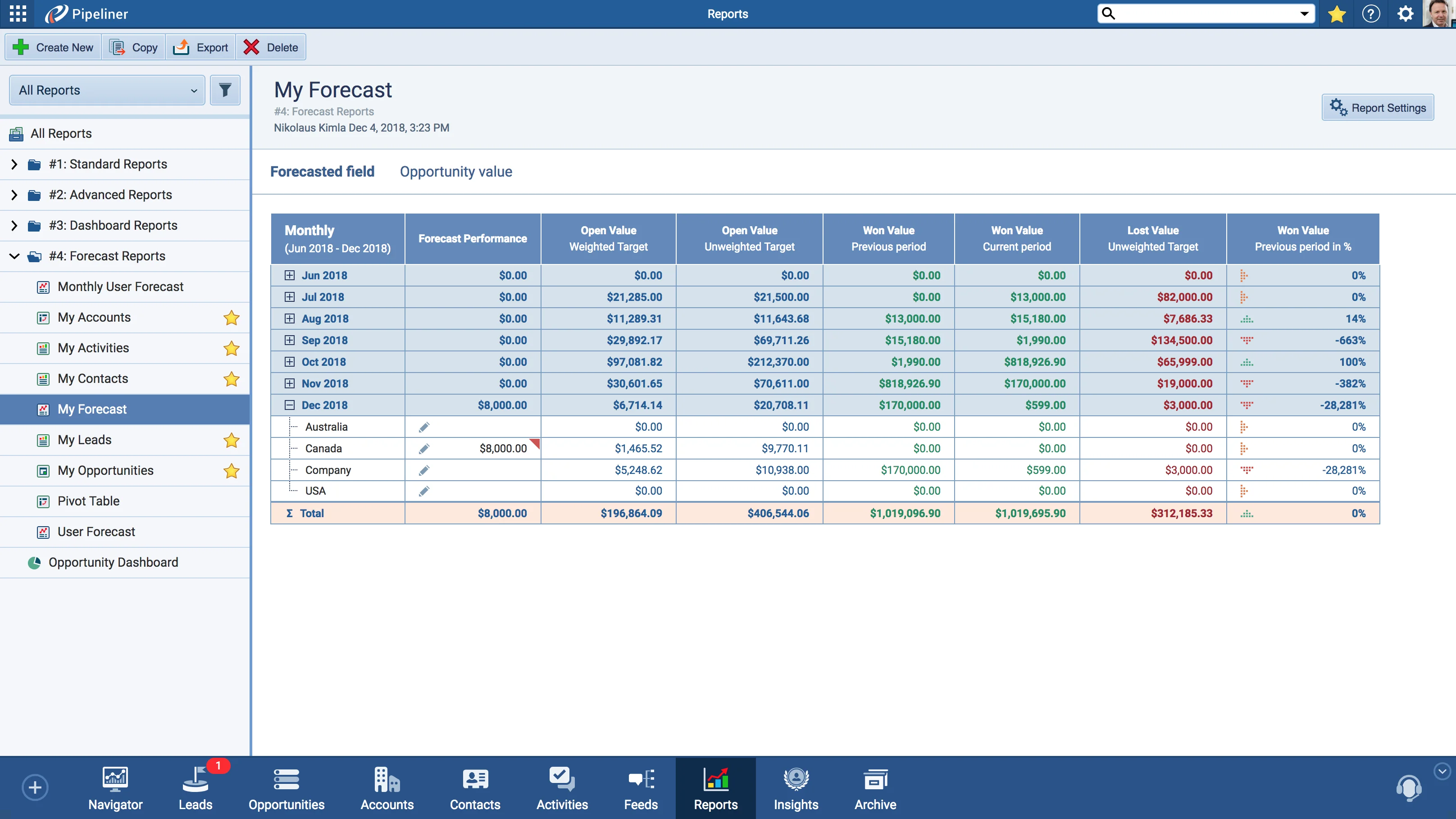
The headline of 1.5.0 is Forecast Reports for Coevera Cloud. Forecast reports let you set, track and manage forecast for people, territories or pipelines, and once quotas are set the report is constantly updated to show each team member's progress against their individual quotas.

Beyond forecasting, reminders gain an AM/PM time view and a Year Selector in the calendar, and Import adds a downloadable sample file, an Account and Contact Card during Lead/Opportunity import, a Parent Account Card during Account import, owner mapping, and faster, optimized import capacity. A batch of further improvements includes Merge for Accounts and Contacts into a single Master Record, Global Search Filter by Owner, an in-app Contact Support form and Admin Live Chat, and an Application Switcher for moving between the App and Admin sections.

What's in this release
  • Forecast Reports for Coevera Cloud let you set, track and manage forecast for people, territories or pipelines.
  • Once quotas are set, Forecast Reports update constantly to show each team member's progress against their individual quotas.
  • Reminders now offer an AM/PM time view.
  • The Reminder calendar adds a Year Selector, opened by clicking the Month/Year at the top.
  • Import can download a sample file from Import › Download Sample File in the top panel.
  • Lead/Opportunity import adds an Account and Contact Card, and Account import adds a Parent Account Card.
  • You can now map the owner during the import process.
  • Import capacity has been sped up and optimized.
  • Merge lets you combine one or more Accounts or Contacts into a single Master Record that keeps all fields and linked items of the merged records.
  • Global Search adds Filter by Owner to find every record assigned to a chosen owner.
  • A Build-In Contact Support form is available from Question mark icon › Contact Support.
  • An Application Switcher on the Grid icon moves between the App and Admin sections, with links to Sales POP! and Go-Ahead!
  • Admin adds a Build-In Live Chat button in the bottom-left corner.
  • Tasks and appointments can now set reminders, owner and sharing when created.
Forecast Units

What we're proud of

Forecast, tracked automatically

Forecast Reports for Coevera Cloud let you set, track and manage forecast for people, territories or pipelines. Once quotas are set, the report is constantly updated to show every team member's progress against their individual quotas.

01New · Reports

Reports Improvements

Forecast Units

Introducing Forecast Reports for Coevera Cloud! Forecast reports allow you to set, track and manage forecast for people, territories or pipelines. Once quotas are set, the report is constantly updated to show progress of team members against their individual quotas.

All screenshots

3
#reports-improvements
02New · Pipeline

Activities Improvements

  • We have updated the Reminder functionality! When setting up a reminder, you now have the ability to choose between “AM/PM” time view. We also added the Year Selector to the Reminder calendar. Click on the Month/Year in the top and easily select the specific year you are looking for.
#activities-improvements
03New · Accounts

Import Functionality Improvements

Reminder Am Pm

In Coevera, you can now download a sample file and Import it to the app. Just click on Import › Download Sample File in the top panel.

We´ve also implemented “Account and Contact Card” during Lead/Opportunity import process and “Parent Account Card” during Account import process.

We added the ability to map owner during import process.

All screenshots

3
#import-functionality-improvements

Various Improvements

Various ImprovementsAccounts
Merge Accounts

A bundle led by Merge for Accounts and Contacts into a single Master Record, plus Global Search Filter by Owner, an in-app Contact Support form and Admin Live Chat, an Application Switcher, task and appointment reminder/owner/sharing settings, and smaller refinements across the Pipeline and Compact View.

All screenshots

7
#various-improvements

Frequently Asked Questions

Forecast Reports for Coevera Cloud let you set, track and manage forecast for people, territories or pipelines. Once quotas are set, the report is constantly updated to show each team member's progress against their individual quotas.

When setting up a reminder you can now choose an AM/PM time view, and the Reminder calendar has a Year Selector — click the Month/Year at the top to select the specific year you need.

In the Import top panel, click Import › Download Sample File to download a sample file you can fill in and import back into the app.

Lead/Opportunity import now includes an Account and Contact Card and Account import includes a Parent Account Card, you can map the owner during import, and import capacity has been sped up and optimized.

Yes. Select one or more Accounts or Contacts and merge them into a single Master Record, which keeps all the fields and linked items of the merged records while the others are deleted.

Use the Build-In Contact Support form at Question mark icon › Contact Support, or the Build-In Live Chat button in the bottom-left corner of the Admin section.

See it in your own pipeline

Start a free trial and explore what's new in Coevera 1.5.0 for yourself.

Keine Kreditkarte erforderlich · 14 Tage kostenlos testen

groupsTrusted by clients around the globeverified_userISO 27001 CertifiedshieldGDPR CompliantblockData never used to train AI
