v4.8.0MinorReleased

New Lead Forms, Lead Processes, Email Permissions and more

Coevera 4.8.0 introduces full Lead Management — build unlimited Lead Processes with a Board View and create multiple Lead Forms per process — and adds Email Permissions so admins can control the sharing and visibility of email content by user role.

PipelineEmailAdministration
Share
Features
3
Improvements
Security
Demnächst verfügbar

Overview

Lead Management leads this release. Coevera Admins can now build an unlimited number of Lead Processes — each with its own steps and an Activities Checklist of text, field, or activity prompts that can be made required, just like an Opportunity Process — and a new Board View gives your business development team the same visualization of where every Lead sits that the Pipeline View gives Opportunities. Alongside the processes, admins can create multiple Lead Forms, each linked to a Lead Process and each capturing a different combination of fields, with matching Lost Lead forms, User Role-level access control, and Automatizer processes that can run by Form Type.

Email Permissions rounds out the release. Because email visibility should be the default in a modern CRM while some messages need to stay private, admins can now set the default Email Message Sharing Rights for each User Role — User will decide, Private only, or Public only — and individual senders or To: recipients can still switch any email between Private, Public, and Custom sharing on a message-by-message basis.

What's in this release
  • Coevera Admins can create an unlimited number of Lead Processes, each with its own steps.
  • Each Lead Process carries an Activities Checklist of text, field, or activity prompts that can be marked required.
  • A new Board View shows where every Lead sits in its process, mirroring the Pipeline View for Opportunities.
  • Admins can create multiple Lead Forms, each linked to a Lead Process and capturing a different combination of fields.
  • Lead Forms can be created new or copied and amended, with fields added or removed by editing the form.
  • When a Process has multiple Forms, users choose which form to use when creating a Lead.
  • A matching Lost Lead form can be enabled or disabled per form type to capture details when a Lead is archived as Lost.
  • Lost Leads are tracked in their own separate Archive area.
  • Access to Lead Form Types and their associated processes can be managed at the User Role level.
  • Automatizer processes can run based on a Lead's Form Type, and Leads can be bulk-updated from one Form Type to another.
  • Admins can set the default Email Message Sharing Rights per User Role: User will decide, Private only, or Public only.
  • Senders and To: recipients can switch an individual email between Private, Public, and Custom sharing.
  • Admin users can be granted rights to delete other users' emails.
  • Emails saved before the 4.8 release are unaffected, but their sharing can still be updated manually.
Brand new Lead Forms

What we're proud of

Full Lead Management arrives

Coevera Admins can now build an unlimited number of Lead Processes, each with its own steps and a required Activities Checklist — exactly like an Opportunity Process. A new Board View, modelled on the Pipeline View for Opportunities, gives your business development team a clear picture of where every Lead sits, right through to the Qualification step that marks a win.

01New · Pipeline

Brand new Lead Forms

Brand new Lead Forms

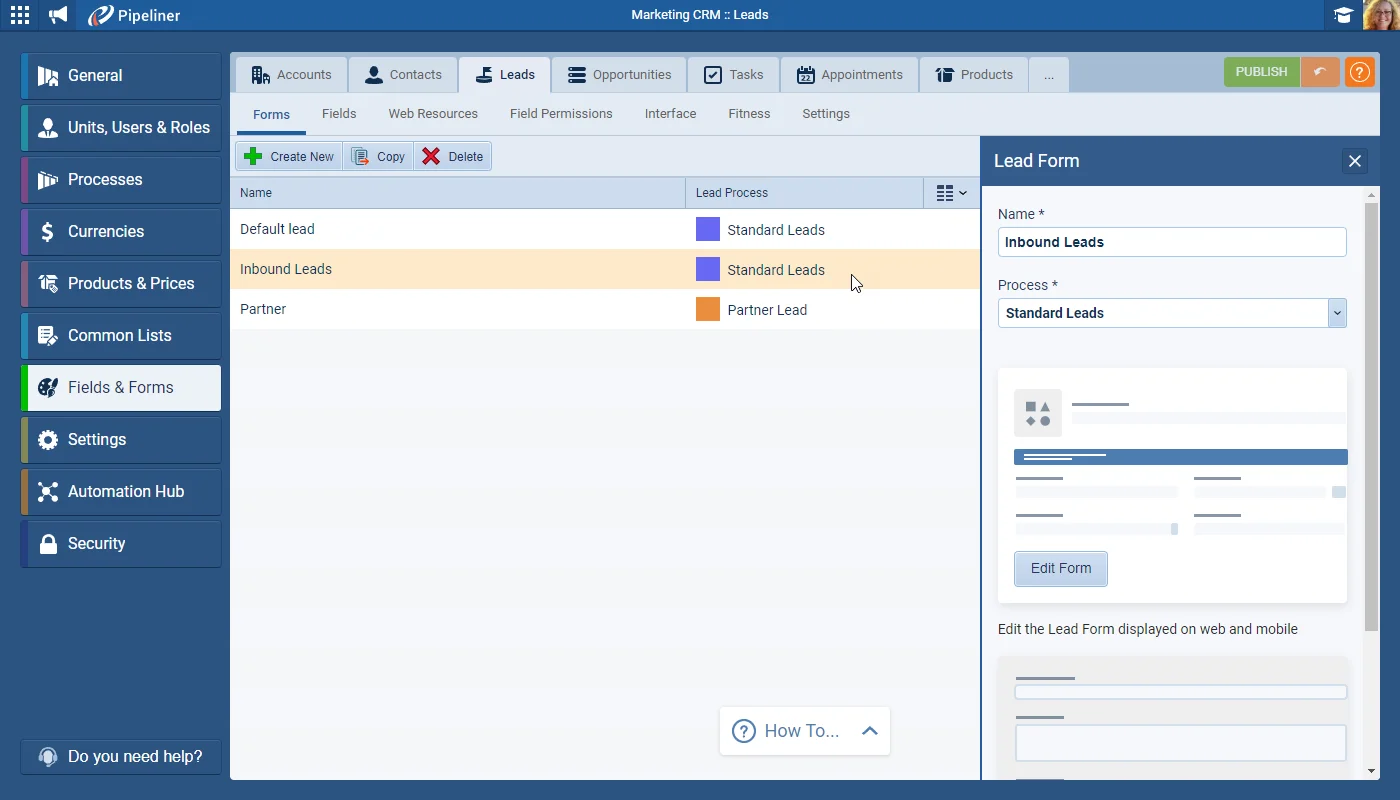
Coevera Admins can now create multiple Lead Forms — similar to those we’ve already implemented for Opportunities (by pipeline), Accounts and Contacts.

Each Form will be linked to a Lead Process — either the default process or a custom Lead Process that has been created. Note that a single Lead Process may have multiple Lead Forms associated with it — each with a different combination of fields to capture specific information. New forms can be created or existing forms copied and amended.

All screenshots

10
Documentation#brand-new-lead-forms
02New · Pipeline

New Lead Processes

New Lead Processes

Our new Lead Management functionality allows Coevera Admins to create an unlimited number of lead Processes, each with different steps and associated Activities Checklist made up of text prompts, field prompts or activity prompts, each of which can be made “required” — just as when creating a pipeline for an “Opportunity Process

All screenshots

2
Documentation#new-lead-processes
03New · Email

Email Permissions

Email Permissions

Visibility of Email communications to and from your customers and prospects is a key pillar of using any modern CRM system. It’s a vital component of the relationships that are built and maintained and, as such, should, in general, be accessible and visible within Coevera.

Having said that, there are certain situations where the content of individual emails should be kept private or where all emails belonging to certain types of user — Senior Management, for example — should not be seen by other users.

Coevera Admins are able to decide on the default Email Message Sharing Rights for each User Role. All users based on that role will then inherit the settings which will be applied as the default to all emails sent from or received by those users.

All screenshots

2
Documentation#email-permissions

Frequently Asked Questions

Coevera Admins can create an unlimited number of Lead Processes — each with its own steps and Activities Checklist — plus multiple Lead Forms linked to those processes, and a new Board View to visualise where every Lead sits.

Lead Forms capture a specific combination of fields for a Lead. Each form is linked to a Lead Process, a single process can have several forms with different field combinations, and forms can be created new or copied and amended.

It's a visualization of your Lead Processes, similar to the Pipeline View for Opportunities, so your business development team can see where all their Leads are in the process and, with a Qualification step as the final state, clearly see their wins.

Yes. A matching Lost Lead form can be enabled per form type to capture details when a Lead is archived as Lost, and Lost Leads are kept in their own separate Archive area.

Admins set the default Email Message Sharing Rights per User Role — User will decide, Private only, or Public only — and individual senders or To: recipients can switch an email between Private, Public, and Custom sharing.

No. Emails saved before the 4.8 release in June 2022 are not affected by changes to Email Message sharing options, though users can still update the sharing of each existing email manually.

See it in your own pipeline

Start a free trial and explore what's new in Coevera 4.8.0 for yourself.

Keine Kreditkarte erforderlich · 14 Tage kostenlos testen

groupsTrusted by clients around the globeverified_userISO 27001 CertifiedshieldGDPR CompliantblockData never used to train AI
