v4.14.0MinorReleased

Brand New Quotes Management, Improved Fields & Forms, Reports & Dashboards, Tags and more

Coevera 4.14.0 introduces a brand-new Quotes feature for preparing, sending, and tracking quotes linked to your opportunities, alongside bulk field-value import in Administration, refreshed Reports & Dashboards, and record-creation and Global Search improvements.

Quotes & DocumentsReportsAdministration
Share
Features
1
Improvements
10
Security
Próximamente

Overview

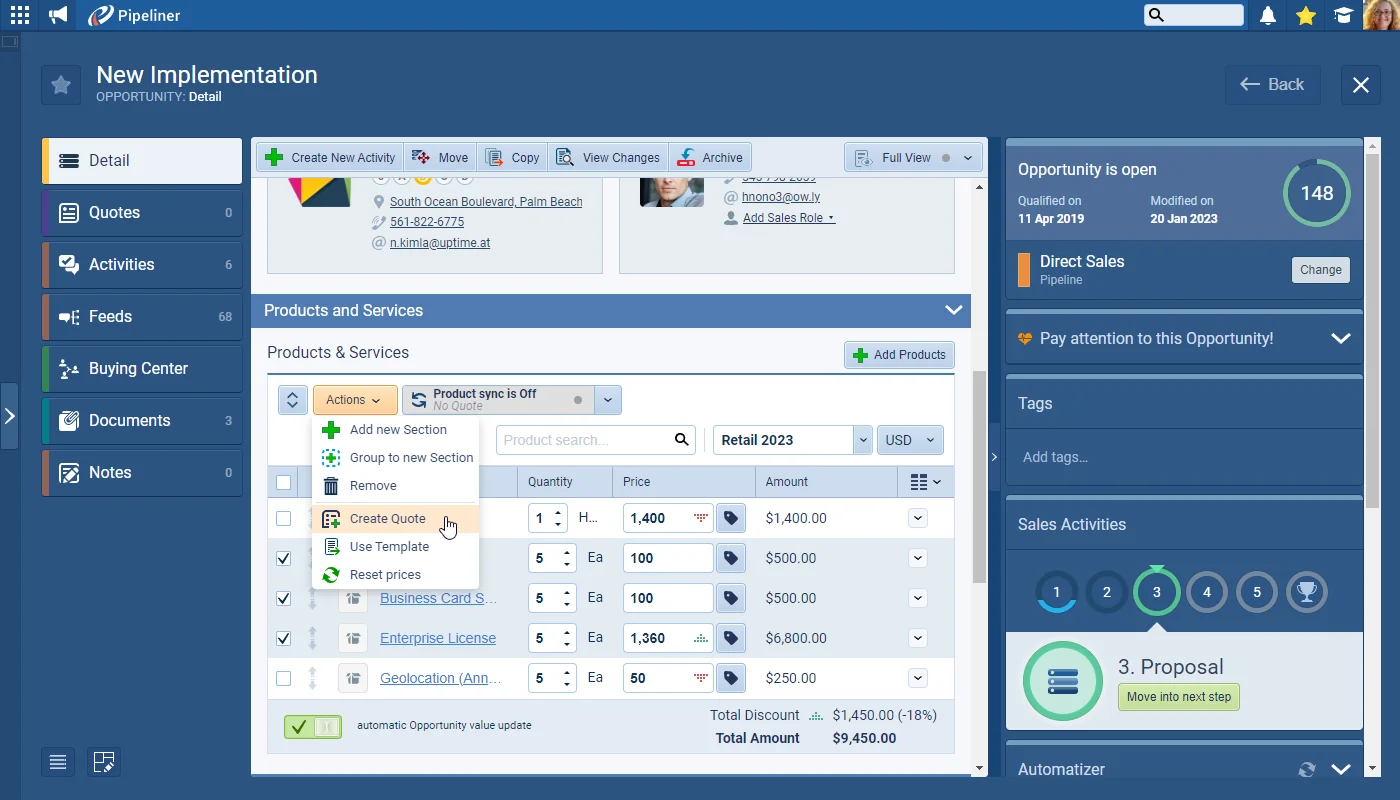
The headline of this release is a brand-new Quotes feature that manages the process of preparing and sending quotes to customers and prospects. An individual Quote can be linked to an Opportunity as well as an Account and Contact(s), and multiple Quotes can be created against the same Opportunity to present different product and service offerings — with products and services synced bi-directionally between a Quote and its Opportunity. Quotes support their own configurable Quote Processes, can be Accepted or Archived in a similar way to Opportunities, work as an Automatizer trigger or action, and can be output to Office 365 Word or Google Docs templates and emailed directly to the customer.

Elsewhere, Administration › Fields & Forms lets admins bulk-add, export, and update the values of validated fields — Dropdowns, Multi select checkboxes, and Radio fields — instead of entering each value by hand, for both out-of-the-box and custom fields. Reports & Dashboards gain a clearer color scheme, pie-chart values displayed outside the chart, an option to show percentages on pie, column, multi-column, and bar charts, full multi-currency columns in reports, and totals on Insights graphs. New records are easier to work with too: tags can be added before a record is created, a notification banner links straight to a newly created record, dropdown, radio, and multi-select values now always follow the admin-defined sort order, and admins can make Coevera record ID fields searchable in Global Search.
What's in this release
  • The brand-new Quotes feature manages the process of preparing and sending quotes to customers and prospects.
  • A Quote can be linked to an Opportunity as well as an Account and Contact(s), and multiple Quotes can sit under one Opportunity with products and services synced bi-directionally.
  • Quotes support configurable Quote Processes and can be Accepted or Archived in a similar way to Opportunities.
  • Quotes can be used as an Automatizer trigger or action, and output to Office 365 Word or Google Docs templates to email directly to the customer.
  • Admins can bulk-add, export, and update Dropdown, Multi select checkbox, and Radio field values instead of entering each one individually — for out-of-the-box and custom fields.
  • Report values use a new color scheme, with pie-chart values now shown outside the chart for readability.
  • Pie, column, multi-column, and bar charts can show percentages as well as, or instead of, numeric values.
  • Reports display and export all multi-currency columns, including the currency symbol, currency code, foreign value, and base value.
  • Insights graphs now display totals so they read correctly when copied into presentations.
  • Tags can be added to a new record before clicking Create or Create & Open.
  • A notification banner appears after Create, linking straight to the new record via a hyperlink or Open button.
  • Dropdown, Radio, and Multi select checkbox values now always follow the admin-defined sort order in Reports and List views.
  • Admins can enable Coevera record ID fields — Lead, Opportunity, Account, Contact, Activity, Appointment, Quote, and Project IDs — to be searchable in Global Search.
Brand New Quotes Management

What we're proud of

Quotes join the sales process

The new Quotes feature manages preparing and sending quotes end to end — link a Quote to an Opportunity, Account, and Contacts, run it through a dedicated Quote Process, keep products and services in sync with the Opportunity, and output the finished quote to an Office 365 Word or Google Docs template to email straight to the customer.

01New · Pipeline

Brand New Quotes Management

Brand New Quotes Management

The “Quotes” feature allows you to manage the process of preparing and sending quotes to your customers and prospects.

Documentation#brand-new-quotes-management

Various Improvements

Various ImprovementsAdministration

Administration › Fields & Forms

Administration › Fields & Forms

Coevera Admins can now import the values for validated fields (Dropdowns, Multi select checkboxes, Radio) instead of entering each value individually. It’s also possible to add/replace/update existing values by first exporting, then editing and then re-importing updated values. These options are available for out-of-the-box fields as well as custom fields.

Select an existing “Dropdown“, “Multi Select Checkbox” or “Radio” field and the “Bulk Add” and “Export” buttons will be available. For a new field, create and save the field and the options will then display when the new field is selected.

All screenshots

3
#administration-fields-forms
Various ImprovementsReports

Reports & Dashboards › Design Updates

Reports & Dashboards › Design Updates

We’ve changed the main color scheme of the reports so that values are better differentiated.

#reports-dashboards-design-updates
Various Improvements

Data display in Pie Charts

Data display in Pie Charts

Pie charts have been updated so that values are displayed outside of the chart for better readability.

#data-display-in-pie-charts
Various Improvements

Percentage values in charts

Percentage values in charts

When using pie, column, multi-column or bar charts, users can now select “Show percentages(as well as, or instead of, “Show numeric values”).

#percentage-values-in-charts
Various Improvements

Report Multi Currency Values

Report Multi Currency Values

When currency fields are included in reports — for example, by selecting “Opportunity Value” — all currency fields will be displayed (and exported).

For our example in the report above using “Opportunity Value“, the following columns will be included in the report:

All screenshots

2
#report-multi-currency-values
Various Improvements

Insights › Graph Values Displayed

Insights › Graph Values Displayed

Values have been added to graphs in Insights so that totals are displayed when graphs are copied to be used in presentations.

#insights-graph-values-displayed
Various ImprovementsPipeline

Adding Tags on Record Creation

Adding Tags on Record Creation

Tags can now be added to a brand new record before clicking on “Create” or “Create & Open

#adding-tags-on-record-creation
Various ImprovementsPipeline

Notifications on Creating Records

Notifications on Creating Records

Once a new record has been created by clicking on the “Create” button (rather than “Create & Open”), a new notification banner will display. Users can click on either the hyperlink or the “Open” button to jump straight to their new record.

#notifications-on-creating-records
Various ImprovementsAdministration

Sorting Values from Dropdown, Radio Button or Multi select Checkbox fields

Values for these fields are now always sorted based on the sort order value set by Admins. Reports & List views are affected by this improvement.

#sorting-values-from-dropdown-radio-button-or-multi-select-checkbox-fields
Various ImprovementsPipeline

Global Search › Search by Coevera Record ID

Global Search › Search by Coevera Record ID

Admins can now enable the Coevera record ID fields to be searchable using the “Global Search

The Coevera record ID fields include: “Lead ID“, “Opportunity ID“, “Account ID“, “Contact ID“, “Activity ID“, “Appointment ID“, “Quote ID“, “Project ID“.

#global-search-search-by-coevera-record-id

Frequently Asked Questions

It manages the process of preparing and sending quotes to customers and prospects. A Quote can be linked to an Opportunity as well as an Account and Contact(s), and you can create multiple Quotes against the same Opportunity to present different product and service offerings.

Yes. Quotes can be used as an Automatizer trigger or action, and the Quote information — including the Products & Services grid — can be output to an Office 365 Word or Google Docs template, attached to the Documents tab, and emailed to the customer with an active Office 365 or Gmail email integration.

You can set up multiple Quote Processes to manage quotes and their follow-up, and Quotes can be Accepted or Archived in a similar way to Opportunities. Follow-up activities can be linked directly to each Quote and appear in the Activities and Feeds menus.

Admins can now import the values for validated fields — Dropdowns, Multi select checkboxes, and Radio fields — instead of entering each one individually, and can add, replace, or update existing values by exporting to CSV, editing, and re-importing with Bulk Add. This works for both out-of-the-box and custom fields.

Report values use a new color scheme, pie-chart values now display outside the chart, and pie, column, multi-column, and bar charts can show percentages. Reports also display and export all multi-currency columns, and Insights graphs now show totals when copied into presentations.

Admins can enable the Coevera record ID fields — including Lead, Opportunity, Account, Contact, Activity, Appointment, Quote, and Project IDs — so they can be found using Global Search.

See it in your own pipeline

Start a free trial and explore what's new in Coevera 4.14.0 for yourself.

No se requiere tarjeta de crédito · Prueba gratuita de 14 días

groupsTrusted by clients around the globeverified_userISO 27001 CertifiedshieldGDPR CompliantblockData never used to train AI