v3.5.0MinorReleased

Scheduled Reports, Automatizer Improvements, Report Improvements and more

Coevera 3.5.0 adds Scheduled Reports to automate report delivery by email, expands report structuring for a 360° view of related records, ships a library of Automatizer process templates, and brings photos and pricing improvements to Products.

ReportsAutomatizerQuotes & Documents
Share
Features
4
Improvements
3
Security
Próximamente

Overview

Reporting leads this release. Scheduled Reports lets you automate the sending of reports via email on a schedule — you set the schedule for each report, choose the email it is attached to (based on a template and personalization if you wish), pick from a range of formats, and can enable password protection for sensitive data. If the report goes to Coevera users, you can even schedule a follow-up task for them directly from the Reports Scheduler. Report Improvements add significant flexibility to how you structure reports: you can bring related-record data into a core report either as Aggregated totals of numeric and currency fields or as All the data you select, and group data or display charts based on those related records.

Beyond reporting, Automatizer gains a ready-made set of process templates drawn from processes the team uses daily and common customer scenarios, plus the ability to update only primary related records rather than all linked records and a Last Run Date shown in the Automatizer widget. Products & Pricing improves too — you can now add photos to Products from a saved image, an image URL, or a mapped Photo URL during import; reorder products in an Opportunity Product Table by drag and drop; set Opportunity Value as read-only so it updates automatically from the Products' Total Amount; and use a new Product Table option in the Excel / Google Sheets Add-In. A batch of usability improvements rounds out the release.

What's in this release
  • Scheduled Reports automate the sending of reports via email on a schedule you choose per report.
  • Scheduled report emails can be based on a template with personalization, use a range of formats, and enable password protection for sensitive data.
  • Reports sent to Coevera users can trigger a scheduled follow-up task directly from the Reports Scheduler.
  • Report Improvements let core reports include related-record data as either Aggregated totals or All selected data.
  • Aggregation returns totals of numeric and currency fields, while All returns all the data you select for the related records.
  • Report data can be grouped and displayed as charts based on the related records included.
  • Accessing the new report relationships requires creating brand-new reports rather than copying existing ones.
  • Automatizer adds a set of process templates you can create from, then publish as-is or modify in the Process Editor.
  • Standard Automatizer processes can update only primary related records instead of all linked records.
  • A Last Run Date now appears in the Automatizer widget to show when a manual process was applied to a record.
  • Products can include photos added from a saved image, an image URL, or a Photo URL mapped during Products Import.
  • Automatic Opportunity Value Update makes Opportunity Value read-only and updates it from the Products' Total Amount.
  • Products in an Opportunity Product Table can be reordered by drag and drop.
  • The Excel / Google Sheets Add-In gains a Product Table option covering all Product and Product Line Item fields.
Scheduled Reports

What we're proud of

Reports that send themselves

Scheduled Reports lets you automate report delivery by email on a set schedule — choosing the format, protecting sensitive data with a password, and even scheduling a follow-up task for Coevera users straight from the Reports Scheduler.

01New · Reports

Scheduled Reports

Scheduled Reports

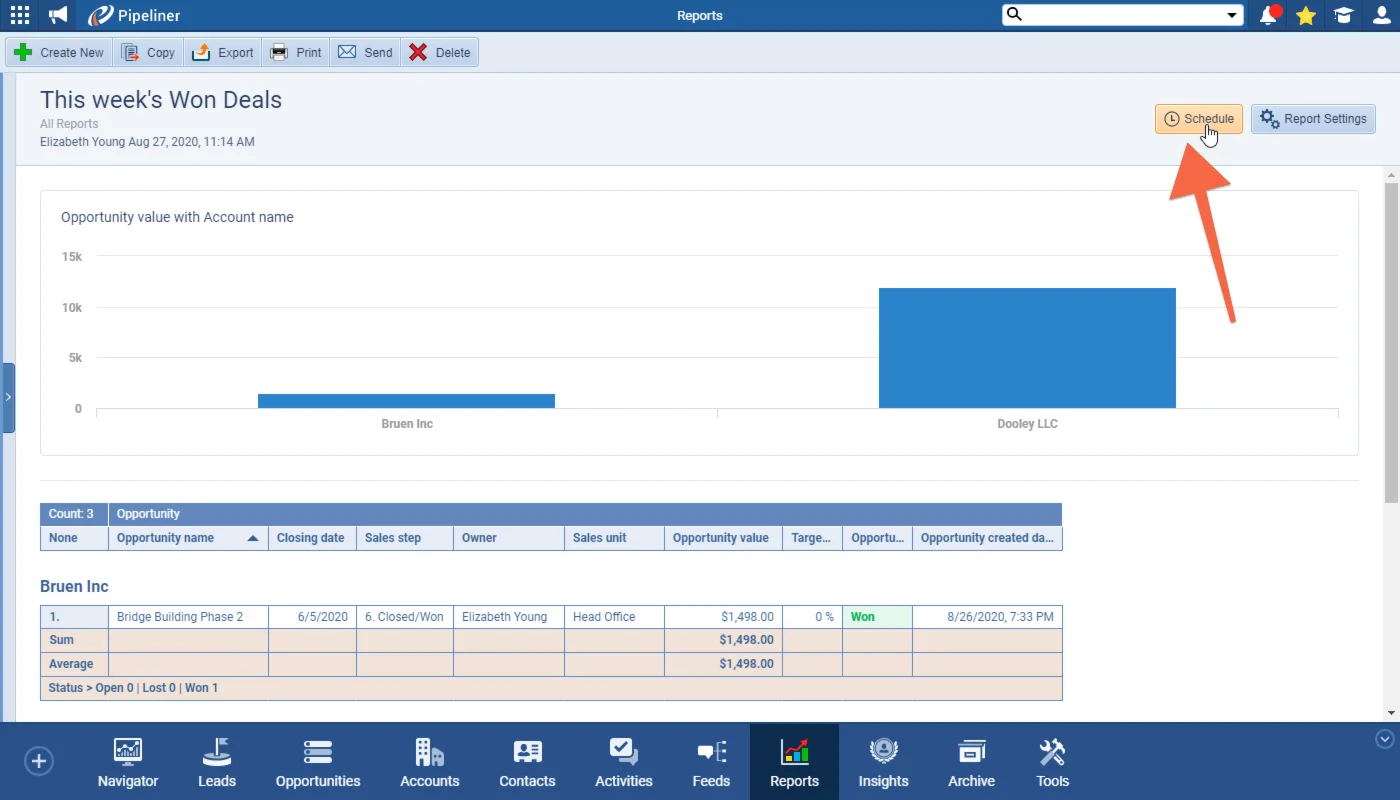
Report Scheduling allows you to automate the sending of reports via email based on a schedule. For each report, you first choose the schedule from the available options. For each report, you first choose the schedule from the available options and then set up the email that the report data should be attached to. You can base the email on a template and/or use personalization options.

You have a range of choices for the format that you wish the report to be sent in and can even enable password protection for sensitive data. Finally, if your report is being sent to Coevera users, you can schedule a follow-up task for them directly from the Reports Scheduler!

All screenshots

3
Documentation#scheduled-reports
02New · Automatizer

Automatizer Improvements

Automatizer Improvements

We’ve taken some of the Automatizer processes we use ourselves every day as well as scenarios that customers ask about and have turned them into an incredibly useful set of Automatizer process templates. These are going to be invaluable to help you get started with using Automatizer as you can review the templates and choose those where the business case works for you.

Click on a template and then the “Create” button to create the process for your space and you can then modify the suggested flow in the Process Editor or simply Publish “as is” and start using.

Click on the Templates tab to see All or choose from one of the Categories to see all the associated templates.

All screenshots

3
Documentation#automatizer-improvements
03New · Reports

Report Improvements

Report Improvements

For most of our customers, reporting is a critical feature in Coevera and so, in this release, we’ve focussed on some significant enhancements to the way that you can structure your reports to give you a 360° view of your data.

There are two main options that you can choose between when adding additional relationships to your core reports:

Let’s use a simple example of an Accounts-based report to which we want to add information about Opportunities linked to each Account. We would add Aggregation of Opportunities to our report in order to see the total value of Opportunities linked to that Account (we could filter just Won Opportunities if we wanted to).

All screenshots

5
Documentation#report-improvements
04New · Pipeline

Products Improvements

Products Improvements

We have created a variety of different improvements to our Products & Pricing functionality. Now you can add photos directly into your Products. Insert images already saved to your computer, or by using an image URL.

Additionally, you can add images using the Products Import and mapping in a Photo URL for each of your Products:

As part of our ongoing useability enhancement program, we’ve updated the following features.

All screenshots

5
Documentation#products-improvements

Various Improvements

Various ImprovementsAdministration
Other Improvements

Modified filters persist across logout and the move from the App to the Admin Module, dropdowns support a blank option to clear a selection, and data import accepts additional custom date formats.

All screenshots

3
#various-improvements

Frequently Asked Questions

Scheduled Reports automate the sending of reports via email on a schedule you choose. For each report you pick the schedule and set up the email the report is attached to, choose from a range of formats, and can enable password protection for sensitive data.

Yes. If the report is being sent to Coevera users, you can schedule a follow-up task for them directly from the Reports Scheduler.

You can add related-record data to your core reports in two ways — Aggregation, which gives totals of numeric or currency fields, or All, which includes all the data you select for the related records. You can also group data and display charts based on those related records. To use the new relationships you need to create brand-new reports rather than copy an existing one.

They are a ready-made set of Automatizer processes drawn from ones the team uses every day and common customer scenarios. You can browse the Templates tab by category, click Create to add a template to your space, then publish it as-is or modify the suggested flow in the Process Editor.

Yes. You can add photos directly to Products from an image saved on your computer or by using an image URL, and you can also map a Photo URL for each Product when using the Products Import.

It lets you set Opportunity Value as read-only so it updates automatically from the Total Amount of your Products, which means you are not rewriting values between Opportunity Value and Product Amount.

See it in your own pipeline

Start a free trial and explore what's new in Coevera 3.5.0 for yourself.

No se requiere tarjeta de crédito · Prueba gratuita de 14 días

groupsTrusted by clients around the globeverified_userISO 27001 CertifiedshieldGDPR CompliantblockData never used to train AI
