v1.6.0MinorReleased

Record Preview Enhancements, Field Validation, New Localization, Administration, Reports Enhancements and more

Coevera 1.6.0 is a speed-and-reporting release: Reports gains Archive Reports, drag-and-drop column reordering, and a fixed Forecast export, while Administration screens load ten times faster with new controls to hide Leads and reuse Opportunity forms.

AdministrationReports
Share
Features
2
Improvements
9
Security
Próximamente

Overview

Version 1.6.0 sharpens day-to-day performance and reporting. In Administration, the users, units, and roles screens now load ten times faster, roles can hide Leads from the bottom menu, Pipeline View, and Archive, and an existing Opportunity form can be copied with a new Reuse button. Reports adds the ability to build Archive Reports — a Report or Dashboard drawn from archived Leads and Opportunities — reorder report columns by drag-and-drop, expand folders automatically when searching, reorder the Create New menu, and it fixes Forecast exporting.

A broad set of Various Improvements rounds out the release. Every List View now shows a Record Preview even in Details for Leads, Opportunities, Contacts, Accounts, and Activities, and record Detail gains a side Pie Chart and Statistical info for Leads, Opportunities, and Activities. New capabilities land for Field Validation on Calculated Fields and for Localization of date, currency, number, and weekday formats. Creation windows are resized to match your admin form configuration, choosing an Owner and editing Sharing when creating Leads, Opportunities, Contacts, or Accounts, Ranking gains percentage information, and the About Coevera panel plus several UI fixes complete the update.

What's in this release
  • Administration screens for users, units, and roles load ten times faster.
  • Roles can hide Leads from the bottom menu, Pipeline View, and Archive.
  • An existing Opportunity form can be copied with the new Reuse button.
  • Archive Reports create a Report or Dashboard from archived Leads and Opportunities.
  • Report columns can be reordered by drag-and-drop in standard Reports and the first level of Advanced reports.
  • Report folders expand automatically when searching for a report inside them.
  • The order of items in the Reports Create New button is rearranged.
  • Forecast exporting is fixed.
  • Every List View now shows a Record Preview even in Details for Leads, Opportunities, Contacts, Accounts, and Activities.
  • Creation windows match your admin form configuration, with Owner selection and Sharing options for Leads, Opportunities, Contacts, and Accounts.
  • Record Detail shows a side Pie Chart and Statistical info for Leads, Opportunities, and Activities.
  • Field Validation is now available on Calculated Fields.
  • Localization lets you switch date, currency, number, and weekday formats by region.
  • Lead and Opportunity Preview adds percentage information to Ranking.
Admin Leads

What we're proud of

Reporting reaches your archive

Archive Reports let you build a Report or Dashboard from archived Leads and Opportunities, and you can now reorder report columns with drag-and-drop and expand folders automatically as you search.

01New · Administration

Administration Improvements

Admin Leads

We speed up the loading experience of the users, units and roles 10-times.

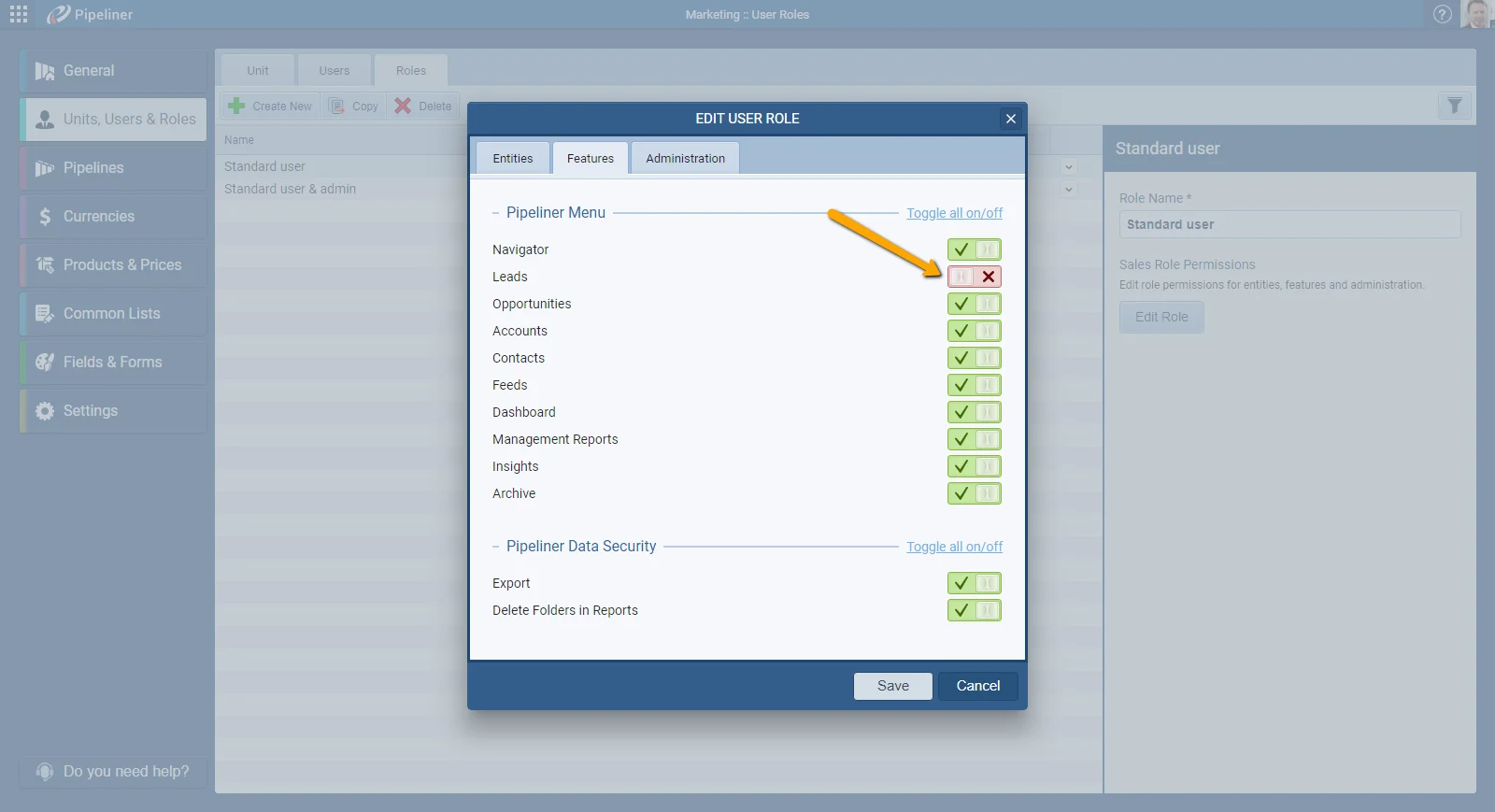
You now have the ability to hide Leads from bottom menu, Pipeline View and Archive. Simply go to Administration › Units, Users and Roles select Roles. Click on Edit Role › Features and turn off “Leads” for Coevera Menu.

In admin section you can now copy existing Opportunity forms! Go to Fields and Forms › Opportunities, select Edit Form and click on Reuse button.

All screenshots

2
#administration-improvements
02New · Reports

Reports Improvements

Archive Reports

Creating Archive Reports is here! You can now create reports – Report or Dashboard, from archived Leads and Opportunities.

You now have the ability to reorder columns directly in the report by simple Drag-and-drop! This functionality is available for standard Reports and first level within Advanced reports.

In Reports, when searching for a specific report that is in folder, this folder will expand for better navigation.

All screenshots

3
#reports-improvements

Various Improvements

Various ImprovementsPipeline
Record Preview

Platform-wide polish — Record Preview in all List Views, side Pie Charts in Detail, Field Validation on Calculated Fields, Localization, and Ranking percentages.

All screenshots

3
#various-improvements

Frequently Asked Questions

The users, units, and roles screens load ten times faster, roles can hide Leads from the bottom menu, Pipeline View, and Archive, and you can copy an existing Opportunity form with the Reuse button.

Archive Reports let you create a Report or Dashboard from archived Leads and Opportunities.

Yes. You can reorder columns directly in the report by drag-and-drop, in standard Reports and the first level of Advanced reports.

Every List View now shows a Record Preview, even in Details, for Leads, Opportunities, Contacts, Accounts, and Activities.

Localization lets you switch the date, currency, number, and weekday formats to match your region.

It lets you validate the value produced by a calculated field — for example a field calculated from two others — and show a message when the final value is wrong.

See it in your own pipeline

Start a free trial and explore what's new in Coevera 1.6.0 for yourself.

No se requiere tarjeta de crédito · Prueba gratuita de 14 días

groupsTrusted by clients around the globeverified_userISO 27001 CertifiedshieldGDPR CompliantblockData never used to train AI
