v1.4.0MinorReleased

Brand New Bulk Update, Contextual Help Guides, Records Preview, Reports, Compact View, Admin Improvements and more

Coevera 1.4.0 upgrades Reports with a new Dashboard Pipeline Velocity Chart, ratio totals and pre-populated Pivot reports, refreshes the Compact view, and adds Bulk Update across records alongside a German-language interface.

AdministrationReports
Share
Features
3
Improvements
7
Security
Próximamente

Overview

Reports lead this release. Pivot Reports now show a "Ratio" in the Main Sum Row, and a new Pivot Report is no longer empty — each Pivot type arrives with a default row and column (for Accounts, the row is Owner and the columns are Sales unit). A brand-new Dashboard Pipeline Velocity Chart can be added from the Power Panel via Add Charts, and Dashboard "Top" charts are fixed to show only the top 5 items. The Compact view gets refreshed Business Overview pie chart visuals plus social media icons for Contacts and Accounts that have linked social media, and inviting users now autodetects your domain and prefills it into the invitation.

A batch of usability improvements rounds out 1.4.0. Bulk Update lets you change any number of Leads, Opportunities, Accounts, or Contacts at once instead of editing records individually; Contextual Help Guides add an in-app tour from the question-mark button; and Coevera is now available in German, switchable between English and German. The Archive List view gains a quick Records Preview, records stay selected after you return from editing, saving and loading are faster, and Google Sync now runs per activated space rather than as a global user setting.

What's in this release
  • Pivot Reports now show a "Ratio" in the Main Sum Row.
  • New Pivot Reports are pre-populated with a default row and column per Pivot type (Accounts uses Owner for rows and Sales unit for columns).
  • A new Dashboard Pipeline Velocity Chart can be added from the Power Panel via Add Charts.
  • Dashboard "Top" charts now show only the top 5 items.
  • The Compact view's Business Overview pie chart has refreshed visuals.
  • Social media icons appear in the Compact view when a Contact or Account has linked social media.
  • Inviting users now autodetects your domain and prefills it into the invitation process.
  • Bulk Update lets you change multiple Leads, Opportunities, Accounts, or Contacts at once.
  • Contextual Help Guides give an in-app tour from the question-mark button in the top panel via Help.
  • Coevera is now available in German, switchable between English and German.
  • The Archive List view adds a quick Records Preview for the selected record.
  • Returning to the List view after editing keeps the edited record selected.
  • Saving and loading are faster thanks to under-the-hood optimizations.
  • Google Sync now syncs per activated space instead of as a global user setting.
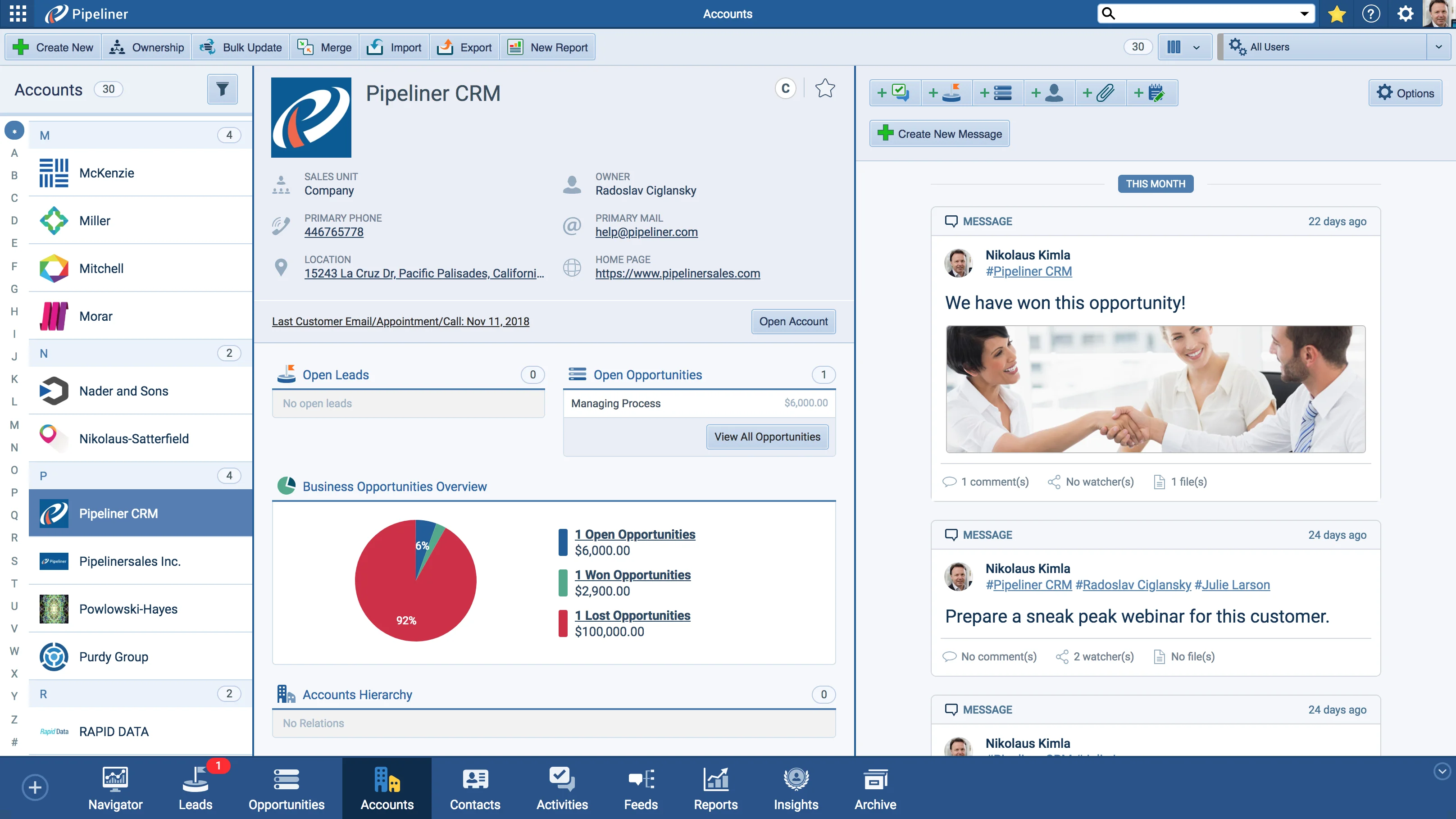
Business Overview Pie Chart

What we're proud of

Update records in bulk

Bulk Update lets you select any number of Leads, Opportunities, Accounts, or Contacts and apply your changes across all of them at once — no more editing records one by one.

01New · Reports

Reports Improvements

We have updated Reports, particularly:

  • Pivot Reports now have “Ratio” in Main Sum Row
  • With the new update, when you create new Pivot Report it is no longer empty (without row or column)! Now for each Pivot type there is default row and column. For example for Accounts the row will be Owner and Accounts columns will be Sales unit.
  • Dashboard Pipeline Velocity Chart is here! Simply open Power Panel in reports Dashboard,select Add Charts and add the brand new Velocity Chart.
  • In Dashboard we also fixed the problem with “Top” charts. Now it only shows the top 5 items to give you a better viewing experience.
#reports-improvements

02New · Accounts

Compact view Improvements

Business Overview Pie Chart

In Compact view, we have updated the Business Overview pie chart with new visuals!

When Contact or Account has linked social media, social media icons will show in the Compact view.

All screenshots

2
#compact-view-improvements
03New · Administration

Admin Improvements

Autofill Domain
  • When inviting users to your space, Coevera now autodetect your domain and prefill it into the invitation process.
#admin-improvements

Various Improvements

Various ImprovementsPipeline
Bulk Update

A batch of usability upgrades: Bulk Update for Leads, Opportunities, Accounts, and Contacts, a German-language interface, Contextual Help Guides, an Archive records preview, retained record selection after editing, faster saving and loading, and per-space Google Sync.

All screenshots

3
#various-improvements

Frequently Asked Questions

Pivot Reports gain a "Ratio" in the Main Sum Row, new Pivot Reports come pre-populated with a default row and column per type, a Dashboard Pipeline Velocity Chart is available, and Dashboard "Top" charts now show only the top 5 items.

It lets you select any number of Leads, Opportunities, Accounts, or Contacts and apply your changes to all of them at once, instead of editing each record individually.

Yes. You can now switch the application between two languages, English or German.

Open the Power Panel in the reports Dashboard, select Add Charts, and add the new Velocity Chart.

The Business Overview pie chart has new visuals, and social media icons appear when a Contact or Account has linked social media.

In-app guided tours you can start by clicking the question-mark button in the top panel and selecting Help.

See it in your own pipeline

Start a free trial and explore what's new in Coevera 1.4.0 for yourself.

No se requiere tarjeta de crédito · Prueba gratuita de 14 días

groupsTrusted by clients around the globeverified_userISO 27001 CertifiedshieldGDPR CompliantblockData never used to train AI