v5.7.0MinorReleased

New Voyager AI Features (Feeds & Emails & Texts), SendGrid Integration, Enhanced Document Templates and other Various Improvements…

Coevera 5.7.0 extends Voyager AI › Feeds, Emails & Texts — generating summaries, action points, suggested replies, and text analysis directly from a record — adds a brand-new Twilio SendGrid integration for mass email, and completely revises the Document Templates add-on.

Voyager AIEmailIntegrations
Share
Features
3
Improvements
10
Security
Próximamente

Overview

Voyager AI leads this release. From the Feeds tab of a record, users can now create a Summary or Action Points from all or selected notes, emails, and messages, and save the result as a Note, Task, Appointment, PDF, Linked PDF, or email. Within an email thread, Voyager AI can also summarise, extract action points, draft a suggested reply, or run Text Analysis for sentiment and tone, categorisation tags, and personal-information extraction — with all processing staying within the same AWS environment as your Coevera space.

Two more features round out the release: a brand-new Twilio SendGrid integration for sending high-volume email from Coevera, activated in the Automation Hub and using SendGrid Senders added as company or personal email accounts, and a completely revised Document Templates add-on that now supports Projects and Custom Entities alongside the main entities, inserts Lookup-field data, and is managed from the Tools menu. Improvements land across the app — Automatizer scheduled actions gain a Minutes option, dynamic filters add Financial Year Quarters, Global Search can show or hide archived records, and Forecast drilldowns inherit their configured columns.

What's in this release
  • Voyager AI can create a Summary of all or selected notes, emails, and messages from the Feeds tab of a record.
  • Voyager AI can extract Action Points from all or selected notes, emails, and messages on the Feeds tab.
  • Voyager AI Summaries and Action Points can be saved as a Note, Task, Appointment, PDF, or Linked PDF, or sent as an email.
  • Within an email or thread, Voyager AI offers Summary, Action Points, Suggested Reply, and Text Analysis.
  • Suggested Reply drafts an email response from the thread content that the user can edit and send via Create Email.
  • Text Analysis reports sentiment and tone, up to five informative categorisation tags, and extracts personal information from a text.
  • Text Analysis extracts names, emails, addresses, URLs, and phone numbers, each with quick follow-up actions.
  • Text Analysis is available in rich text fields, notes, email detail, and the email editor.
  • All Voyager AI Feeds, email, and text processing stays within the same AWS environment as your Coevera space.
  • A new Twilio SendGrid integration, activated in the Automation Hub, sends high-volume email from Coevera.
  • SendGrid Senders can be added as company or personal email accounts, with mass email statistics synced back to Coevera.
  • The revised Document Templates add-on supports Projects and Custom Entities and Lookup-field data, managed from the Tools menu.
  • Automatizer scheduled actions add a Minutes option for more precise, near-real-time delays.
  • Global Search adds a checkbox to show or hide archived records, which display with an (Archived) suffix.
Summary

What we're proud of

AI across Feeds, emails, and texts

Voyager AI can now summarise or pull Action Points from the notes, emails, and messages on any record's Feeds tab, draft suggested replies inside an email thread, and run Text Analysis for sentiment, tags, and contact details. Every request is processed within the same AWS environment as your Coevera space, so there is no security risk to your customer data.

01New · Voyager AI

New Voyager AI Features › Feeds & Emails & Texts

Summary

Powerful and secure new features added to our Voyager AI assistant allow users to create a "Summary" or "Action Points" based on the content of emails, text messages and notes on the "Feeds" tab of a record. All data remains securely within the same AWS environment as your Coevera space when using these new features so there is no security risk to your customer data!

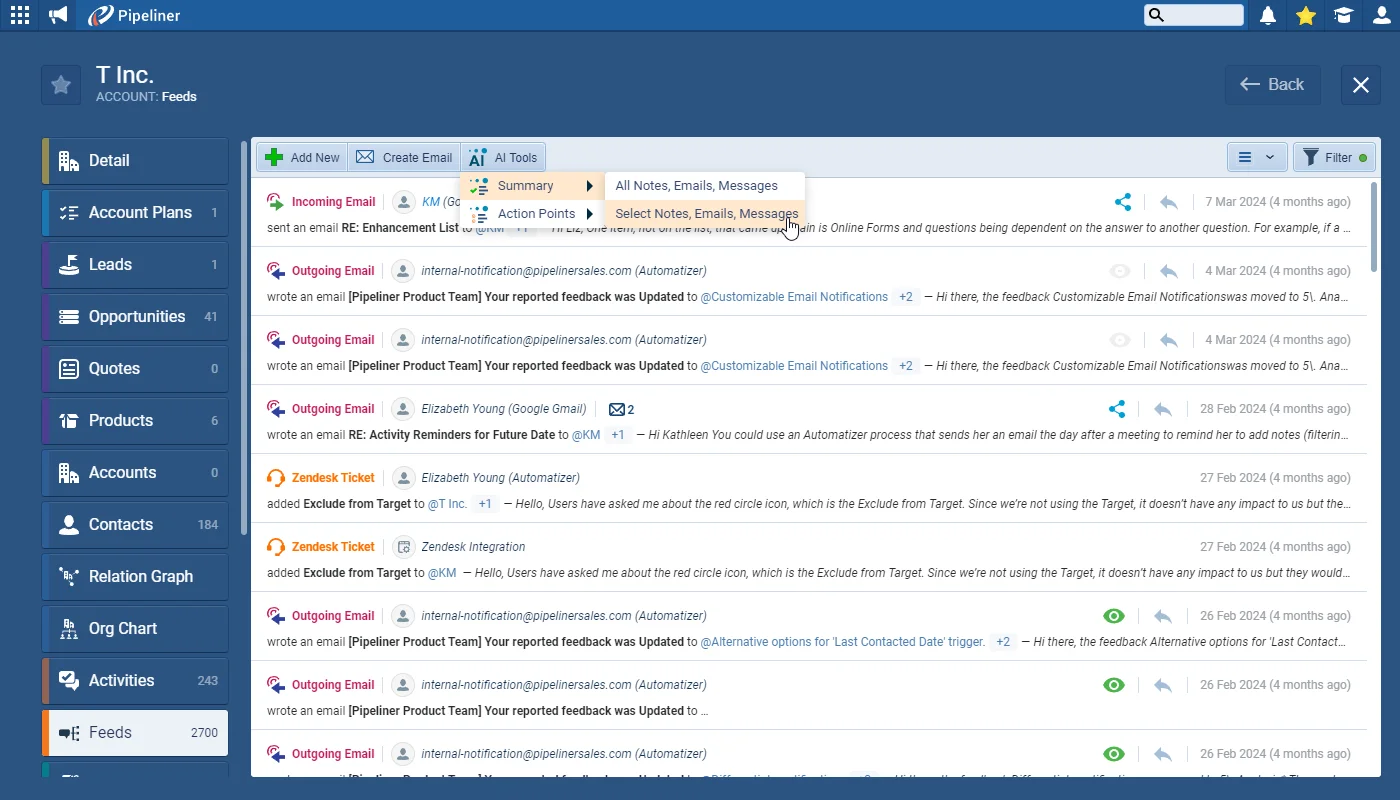
Users can access the "AI Tools" option on the menu bar of the "Feeds" tab of a record to create a "Summary" of "Notes", "Emails" and "Messages" (All or Selected) or to create "Action Points" based on "Notes", "Emails" and "Messages" (All or Selected).

The "Voyager AI" will summarize all/selected feeds into summarization points and categories and will distinguish between types of feeds such as notes, emails, etc.

All screenshots

6
Documentation#new-voyager-ai-features-feeds-emails-texts
02New · Integrations

Brand New SendGrid Integration

Brand New SendGrid Integration

This release includes a valuable additional integration option for our many customers who are using Coevera for more and more of their marketing activities. Customers can now sign up for a “Twilio SendGrid” account and use it for sending emails from Coevera. SendGrid is designed to allow the sending of thousands of marketing emails every month as well as protecting the sender’s reputation and preventing marketing emails from being flagged as Spam.

Admins can activate the “Twilio SendGrid” integration in the “Automation Hub“.

All screenshots

6
DocumentationDocumentation#brand-new-sendgrid-integration
03New · Quotes & Documents

Document Templates Improvements

Document Templates Improvements

The Document Templates Add-on has been completely revised and improved to also allow users to access both Projects and Custom Entities as well as the existing main Entities. It is also possible to insert the details of linked entities used in “Lookup” fields into a template — this works in the same way as inserting “Product Details” into an “Opportunity Template“.

Document Templates are now managed from a new option in the “Tools” menu to align with other features such as “Email Templates“.

All screenshots

7
Documentation#document-templates-improvements

Various Improvements

As part of our ongoing usability enhancement program, we’ve updated the following features.

Various ImprovementsPipeline

Recent fields in form field selection

Recent fields in form field selection

A “Recent” section has been added to the “Quick search” for a field or section in the “Record Detail“. The “Recent” section displays the last 3 clicked fields and is remembered per entity per form per user.

#recent-fields-in-form-field-selection
Various ImprovementsReports

Add Financial Quarters to Dynamic Filter Conditions

Add Financial Quarters to Dynamic Filter Conditions

Those customers who work with a custom financial year setup can now use “Financial Year Quarters” that will be calculated dynamically based on the setting in “Space Administration › Settings › Global › Financial year“.

These options are available only for the “dynamic period is” and “dynamic period is not” date operators.

#add-financial-quarters-to-dynamic-filter-conditions
Various ImprovementsPipeline

Search in Lookup fields

Search in Lookup fields

When searching for records to add to a “Lookup” field, all fields that are available in the “Global Search” will also work in “Lookup” field searches. “Name” will still be the default lookup criterion.

#search-in-lookup-fields
Various ImprovementsEmail

Mass Email Detail & Online Form detail

The default “List View” column “Sorting” and “Reordering” is now also available in “Mass Email” and “Online Form” detail lists.

#mass-email-detail-online-form-detail
Various ImprovementsEmail

Mass email detail

Mass email detail

There will only be one setting shared across all tabs:

  • The last column will be sorted by the number of emails within the thread.
  • Default sorting will be by “NameASC.
#mass-email-detail
Various ImprovementsIntegrations

Online form detail

Online form detail

Each tab will have its own setting (stored separately & per user):

  • Responded” & “Unknown Respondents” tabs › Default sorting will be “Responded Date“.
  • Sent & Sent and not responded › Default sorting is by “Sent Date“.
#online-form-detail
Various ImprovementsAutomatizer

Automatizer: Scheduled Action — “Add Minutes” option

Scheduled” actions in processes will have an option — “Minutes” — for more precise scheduling. This is intended to assist where updates should happen as near to real-time as possible but need to have a short delay built in to account for the processing time of the initial step across many records.

#automatizer-scheduled-action-add-minutes-option
Various ImprovementsReports

Forecasts

Forecasts

In Forecasts, when a user clicks on a chart to open a drilldown list, the columns displayed in the drilldown list will be the same as those selected in the “List” tab under “Drill down” in the “Forecast Settings“.

#forecasts
Various ImprovementsAdministration

Auto Reload the App when a new version is released

Auto Reload the App when a new version is released

We have added a new detection mechanism that will automatically appear to a user when a new major version has been released but the user has not reloaded or refreshed Coevera. The user will now be prompted to reload (can choose reload page in the browser).

#auto-reload-the-app-when-a-new-version-is-released
Various ImprovementsPipeline

Global search — the ability to show or hide Archived records

Global search — the ability to show or hide Archived records

A checkbox has been added to the “Records” dropdown to allow users to select if they want to search in archived records or not. Users can access and change this particular setting in both the “Global Search” and the “Advanced Global” search. This checkbox remains active or inactive, depending on the user’s preference, if it has been applied in either of these two places.

There is also a new card preview for the “Archived” records with a suffix (Archived) shown in the record name.

#global-search-the-ability-to-show-or-hide-archived-records

Frequently Asked Questions

From the Feeds tab of a record you can create a Summary or Action Points from all or selected notes, emails, and messages, and inside an email thread Voyager AI can also draft a suggested reply or run Text Analysis. Results can be saved as a Note, Task, Appointment, PDF, or Linked PDF, or sent as an email.

Yes. All data remains within the same AWS environment as your Coevera space when using these features, so there is no security risk to your customer data.

Text Analysis reports the sentiment and tone of a text or email, extracts up to five informative categorisation tags, and pulls out personal information such as names, emails, addresses, URLs, and phone numbers — each with a quick follow-up action. It is available in rich text fields, notes, email detail, and the email editor.

Coevera now integrates with Twilio SendGrid so you can send high-volume email from Coevera rather than through your Microsoft Office 365 or Gmail server. Admins activate it in the Automation Hub, then add SendGrid Senders as company or personal email accounts using an API key from SendGrid.

The Document Templates add-on has been completely revised so templates can be based on Projects and Custom Entities as well as the existing main entities, and can insert data from entities linked in Lookup fields. Templates are now managed from a new option in the Tools menu.

Usability improvements include a Minutes option for Automatizer scheduled actions, Financial Year Quarters in dynamic filter conditions, the ability to show or hide archived records in Global Search, Forecast drilldown columns that match your Forecast Settings, and a prompt to reload Coevera when a new version is released.

Put Voyager AI to work

Start a free trial and explore what's new in Coevera 5.7.0 — from Voyager AI across your Feeds and emails to the new SendGrid integration.

No se requiere tarjeta de crédito · Prueba gratuita de 14 días

groupsTrusted by clients around the globeverified_userISO 27001 CertifiedshieldGDPR CompliantblockData never used to train AI