Empresa

Acerca dePrensaContacto

Iniciar sesión

loginCoevera CRMsettingsFacturación

Idioma

EnglishDeutsch
Pruébelo gratis

The Who, What & Where Of Sales

Sales has never had richer maps of who knows whom — yet the modern enterprise is a tangled web of employees, consultants, contractors, subsidiaries, and partners. The networks that open new doors are the same ones that make every prospect harder to navigate.

Published Updated 2 min read
Share
The Who, What & Where Of Sales

There is no doubt that Sales is becoming more complicated due to the ever-expanding networks that prospects and clients are part of. The advantage is that Salespeople can search these network connections as many of them are digitally available (LinkedIn, Alumni websites, etc) and discover the kind of six degrees of separation that would have been virtually impossible in the old analog world. This can be a great help in finding creative and alternative ways of reaching and/or influencing prospects. On the flip side, though, the nature of business has changed that today your average enterprise likely has a mix of employees, consultants, contractors with subsidiaries and partners also providing services in ways they previously didn’t. This represents quite the tangled web for a Salesperson to navigate and can seem really daunting.

The key to overcoming these challenges is to step back and carefully map out the relationships your contacts and accounts have and then assess what their level of influence or relationship is. Then you can label them according to that level of influence. To make this easy to do, we built some new visual mapping capabilities into Coevera. Now a salesperson can see who is influencing their Contacts, who their Accounts are connected to and the type of relationship. Plus they can now visually see the details of their Accounts, Contacts, Opportunities, and Leads in the Map view.
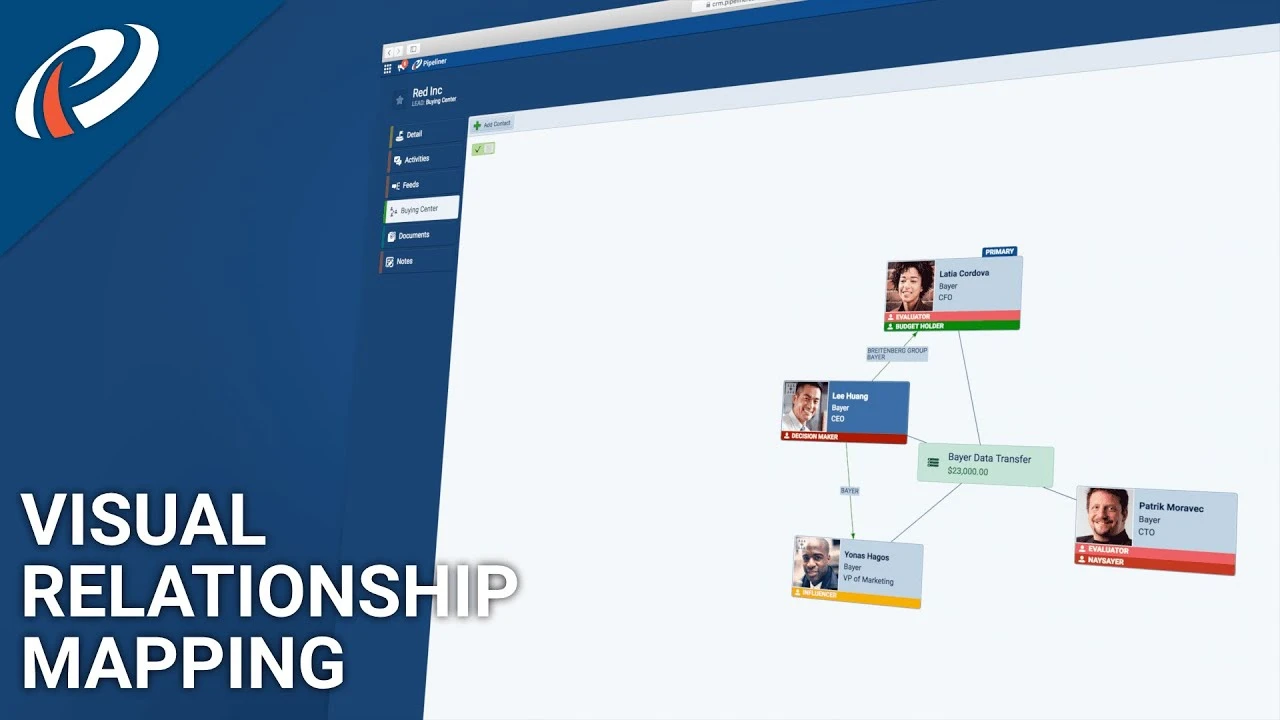
Video thumbnail: Coevera contact relationship mappingplay_arrow

These unique features include:

Contact Relationship Mapping

  • Build a Relation Graph for a Contact
  • Map out their connections & who is influencing them
  • Assign roles to their contacts (e.g. business partners, friends, colleagues)
  • Easily move, add, change contact relations as needed
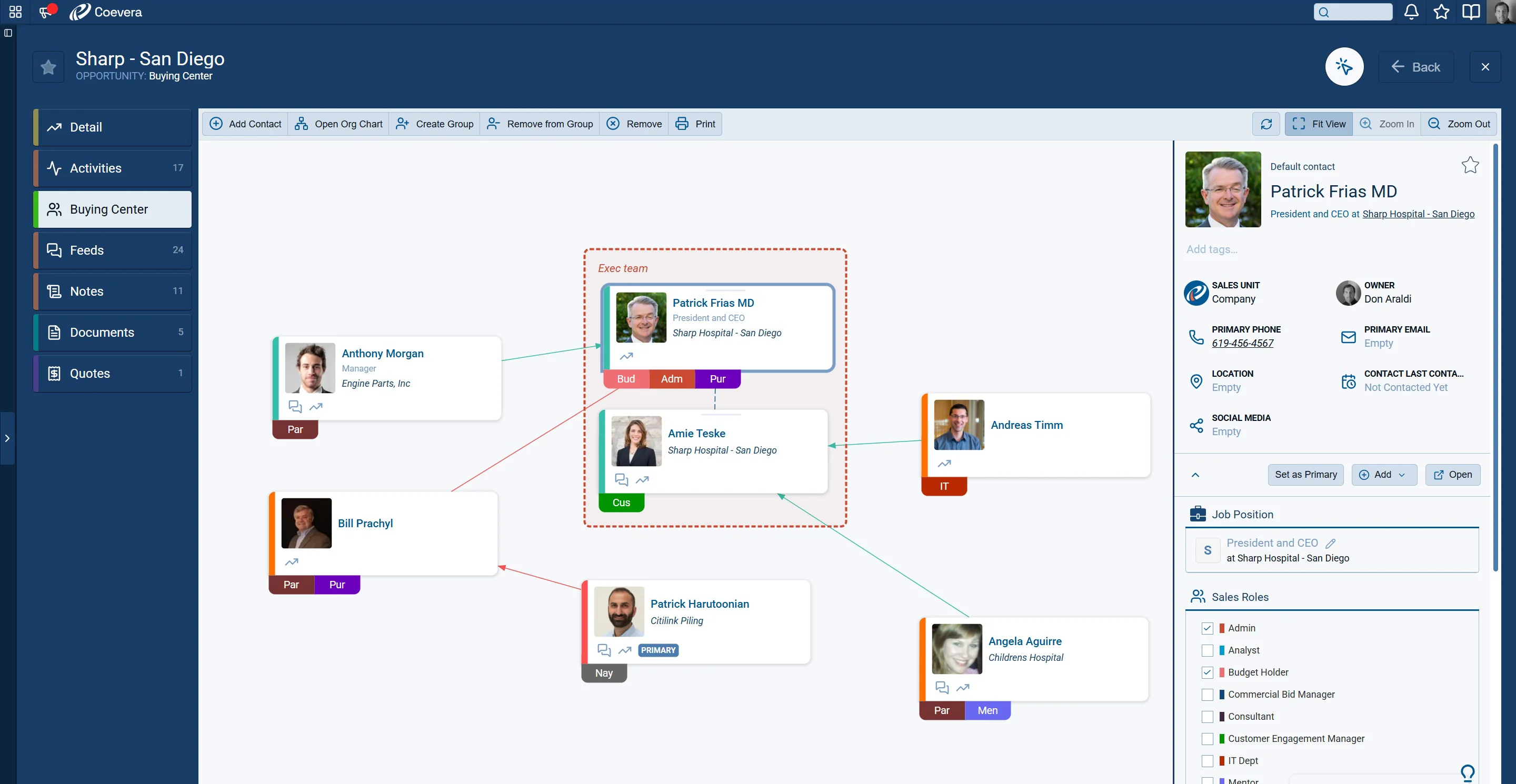
Coevera Buying Center with mapped contact relationships and influence

Account Relationship Mapping

  • Build a Relation Graph for an Account
  • Map out what other companies they are connected to
  • Assign labels to those companies (e.g. Subsidiary, Supplier, Client)
  • Easily move, add, change Account relations as needed
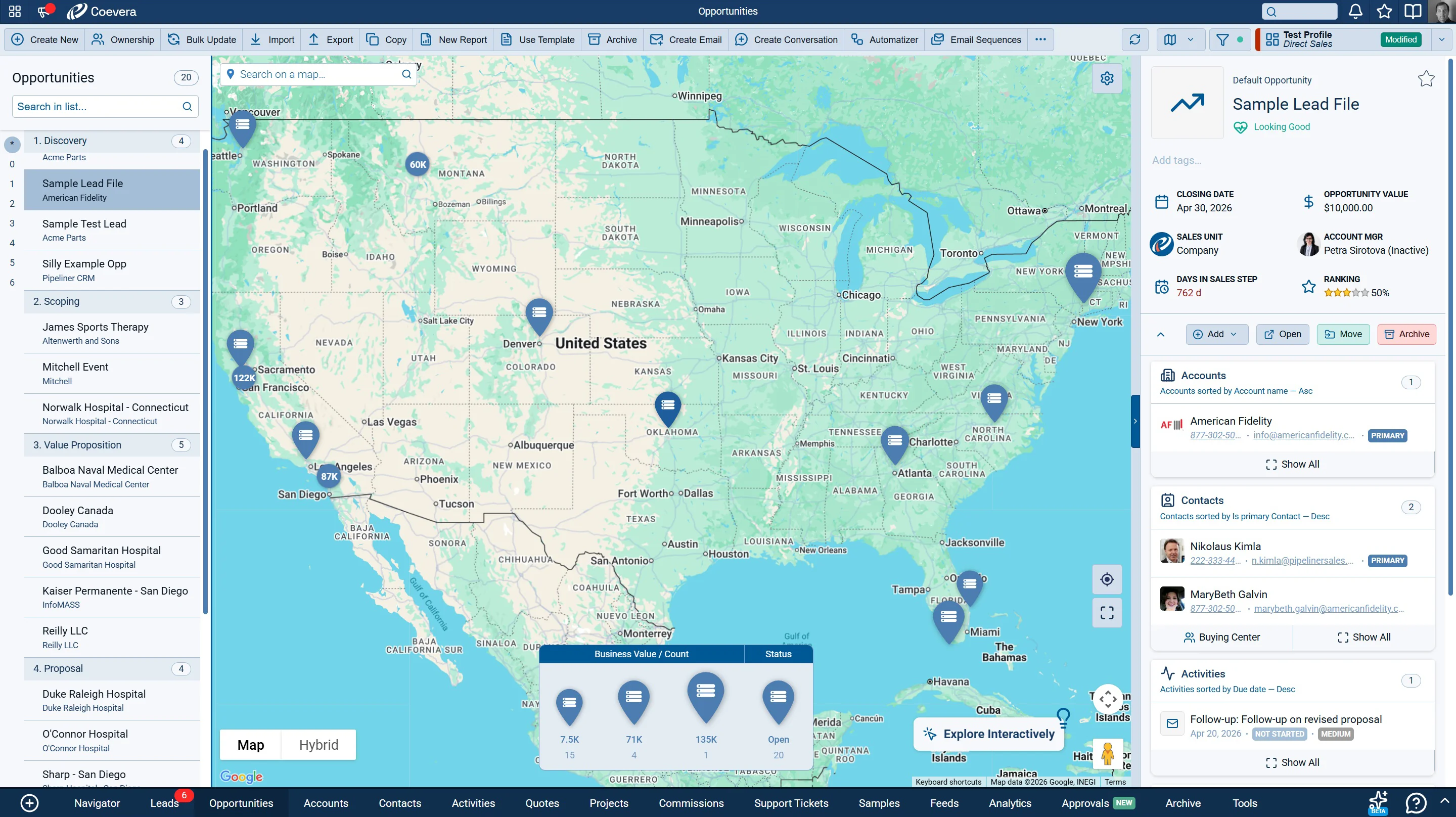
Coevera Map view showing accounts, opportunities and leads geographically

Detailed Map Views

  • See the location of your Accounts, Opportunities, Leads, and Contacts on the Map
  • Quick filter what you want to display on the marker (e.g. opportunity value)
  • Click Marker to see and edit details
  • Opportunities have a legend showing business overview (e,g. won, lost, value)

These new additions added to our existing Organization Chart and Buying Center mapping features further underlines that Coevera is the most visual, interactive and dynamic CRM system on the market and why Gartner included Coevera on the Magic Quadrant for Sales Force Automation in 2019 – click here to access report.

To see these new features in action take a free trial of Coevera.

FAQ

Common questions about visual relationship mapping in sales

Why has selling become more complicated according to the article?
Selling has become more complicated due to the ever-expanding networks prospects and clients belong to, and because the average enterprise now mixes employees, consultants, contractors, subsidiaries, and partners. This creates a tangled web for salespeople to navigate, though digitally available connections can also reveal creative ways to reach prospects.
What is Contact Relationship Mapping in Coevera?
Contact Relationship Mapping lets you build a Relation Graph for a contact, map out their connections and who is influencing them, and assign roles such as business partners, friends, or colleagues. You can easily move, add, or change contact relations as needed to keep the picture accurate.
How does Account Relationship Mapping work?
Account Relationship Mapping lets you build a Relation Graph for an account, map out what other companies it is connected to, and assign labels such as Subsidiary, Supplier, or Client. As with contacts, you can easily move, add, or change account relations whenever they change.
What can you do with Coevera's Map view?
Coevera's Map view shows the location of your Accounts, Opportunities, Leads, and Contacts. You can quick-filter what to display on the marker, such as opportunity value, and click a marker to see and edit details. Opportunities include a legend showing a business overview such as won, lost, and value.
What makes Coevera such a visual CRM?
New visual mapping capabilities, added to the existing Organization Chart and Buying Center features, make Coevera one of the most visual, interactive and dynamic CRMs available. Coevera was also included on Gartner's Magic Quadrant for Sales Force Automation in 2019.

Ready to see Coevera in action?

Start your 14-day free trial — no credit card, no commitment.

No se requiere tarjeta de crédito · Prueba gratuita de 14 días

groupsTrusted by clients around the globeverified_userISO 27001 CertifiedshieldGDPR CompliantblockData never used to train AI
The Who, What & Where Of Sales - Coevera