
Sales documents have a way of scattering. The proposal lives in someone's cloud drive, the signed contract sits in an inbox, and the latest quote is a version nobody can find. A CRM for managing sales documents pulls all of it into the deal record, so the right file is one click away and nothing goes missing at signing. The catch is that CRMs handle documents very differently, and a few dedicated tools do parts of the job better than most.
The best CRM for managing sales documents in 2026 is Coevera, which links every file to its deal record and holds SelectHub's best-in-class award for document management. Zoho CRM and Bitrix24 offer the deepest built-in document suites, HubSpot leads on document tracking and quotes, and Pipedrive's Smart Docs is the simplest way to send trackable proposals. For CRMs that are light on documents, PandaDoc plugs in to generate proposals and contracts. The full ranking is below.
What to look for in a CRM for sales documents
Document management covers two core jobs, and few tools do both equally well. First, storage: keeping files linked to the right deal, account, and contact instead of a shared drive. Second, generation: building quotes, proposals, and contracts from CRM data so reps do not retype anything. Decide which matters more to your team, then read the list against that.
Best CRM for sales documents at a glance
Here is how the tools compare on type, best use, and how each one handles documents.
| Tool | Type | Best for | Document approach |
|---|---|---|---|
| Coevera | CRM | Best overall | Files linked to the deal record |
| Zoho CRM | CRM | Built-in document suite | Built-in suite via WorkDrive |
| HubSpot | CRM | Document tracking and quotes | Tracking, library, and quotes |
| Pipedrive | CRM | Simple doc generation | Smart Docs generation |
| Salesforce | CRM | Enterprise and CPQ | Files plus CPQ and add-ons |
| Bitrix24 | CRM | All-in-one document bundle | Built-in editing and storage |
| PandaDoc | Doc tool | Proposals and contracts | Template document generation |
How we evaluated
We scored each tool on how well it links documents to deals, whether it generates quotes and proposals from CRM data, and its security and access controls. The first six entries are CRMs, ranked for mid-market B2B teams. The last is a document tool that plugs into whatever CRM you use. Coevera publishes this guide, and we hold our own product to the same criteria and the same sourcing standard as every competitor listed.
1. Coevera: best overall for B2B
Coevera tops the list because it treats documents as part of the deal, not a filing cabinet. The software-selection platform SelectHub gave it a best-in-class award for document management (as Pipeliner CRM, relaunched as Coevera in 2026). Files are linked directly to the record they belong to, you can keep shared company documents and deal-specific documents in one place, and MS Office and Google templates let reps generate branded agreements in a click. You can also connect existing cloud storage like Google Drive, Dropbox, or SharePoint instead of migrating files, and control access with user rights.
Where it fits: B2B sales organizations of 15 to 2,500 sellers that want documents organized around deals, not scattered across drives. Watch-outs: no permanently free plan. Start with a 14-day free trial, and see the pricing page for current plans and tiers.
2. Zoho CRM: best built-in document suite
Zoho CRM has the deepest native document stack of the group. Its Documents tab is powered by Zoho WorkDrive, with version control and secure sharing (Zoho notes the WorkDrive-powered tab is rolling out in stages and is currently available for new CRM sign-ups). It also adds CPQ for quotes, and meets SOC 2, ISO 27001, GDPR, and HIPAA standards.
Where it fits: teams that want storage and generation bundled in one CRM. Watch-outs: the breadth can feel busy and may need configuration time. A free plan covers up to three users.
3. HubSpot: best for document tracking and quotes
HubSpot's strength is knowing what happens after you hit send. Its document tracking notifies you when a prospect opens or shares a file, builds a trackable content library, and its quotes tool records acceptance and takes payment. Document tracking is free to start, with more in the paid Sales Hub tiers.
Where it fits: teams that want engagement insight on every document and quote. Watch-outs: the strongest document and quote features sit on higher paid tiers rather than the free or entry plans, so confirm what your plan includes before you commit.
4. Pipedrive: best for simple document generation
Pipedrive's Smart Docs is the fastest way to send a trackable quote, proposal, or contract that auto-fills from CRM data. It keeps the whole document step inside the deal.
Where it fits: small teams that want quick, trackable documents without extra tools. Watch-outs: Smart Docs is included on higher tiers and available as a paid add-on on entry plans, so confirm your tier includes it before you rely on it.
5. Salesforce: best for enterprise and CPQ
Salesforce handles documents through Files and a deep CPQ and AppExchange ecosystem, so large teams can build almost any document and quoting workflow. The power comes with complexity.
Where it fits: large teams with admins and complex quoting needs. Watch-outs: most document generation depends on add-ons, and cost and complexity rise fast as you scale. See our guide to the best CRM for B2B sales teams for a deeper look.
6. Bitrix24: best all-in-one document bundle
Bitrix24 bundles CRM with document editing and storage, and it charges per organization rather than per user, so a team that fits within a plan's limits gets a lot in one tool.
Where it fits: smaller teams that want documents and CRM together in one tool. Watch-outs: per-organization plans come with user caps, so check the ceiling before you scale. A free plan is available to start.
Document tools to add to your CRM
If your CRM stores documents well but does not generate proposals and contracts, add a dedicated tool that integrates with the major CRMs.
PandaDoc: best for proposals and contracts
PandaDoc builds proposals, quotes, and contracts from templates, tracks them, and syncs back to your CRM. A free plan covers occasional use, with paid tiers for teams that send documents regularly.
Keep every sales document with its deal
Try Coevera free for 14 days. No credit card required.
Start free trial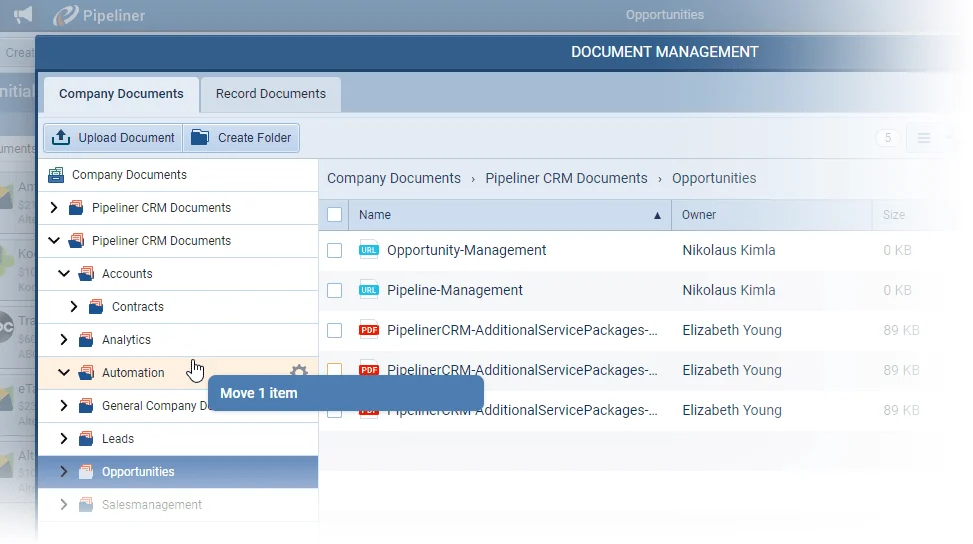
How to choose
Start with the job that hurts most. If files go missing, prioritize storage that links to the deal, and Coevera leads there. If reps waste time rebuilding quotes, prioritize generation, where Zoho, Pipedrive, and PandaDoc are strong. Then run a short pilot with real documents before you commit, because the tool your team actually uses beats the one with the longest feature list.