v4.13.0MinorReleased

Brand New Targets, Improved Multi Language Support, Reporting and more

Coevera 4.13.0 introduces Targets to track the sales performance of users and teams, adds Multi Language Support in the Admin Module, and ships a batch of Reporting Improvements alongside new BI Feeder fields.

ReportsAdministration
Share
Features
3
Improvements
4
Security
Demnächst verfügbar

Overview

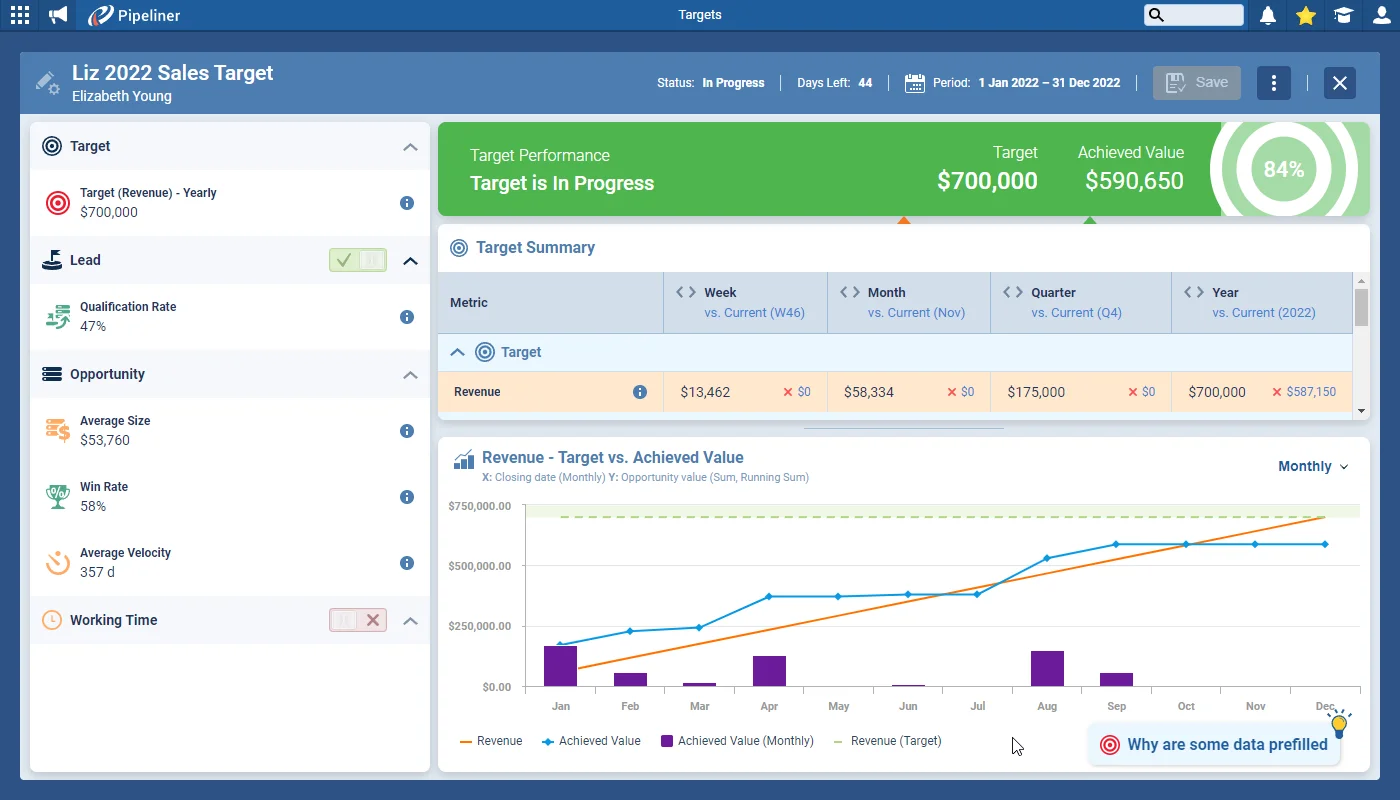
The headline of this release is Targets. Targets track the performance of individual users or teams — groups of users — using data from the Leads and Opportunities they work on in Coevera. A new Target is pre-populated with data based on the selected user(s)' historical performance; you work within a draft, change values to see the immediate impact on predicted performance, then Activate it to set it live and monitor real-time progress until its end date passes. Choose a Revenue Target for sales users, or Leads Qualified or Leads Created Targets for business development reps, and focus on an individual with User Targets or a whole team with Group Targets.

Beyond Targets, Multi Language Support lets administrators add translations for field names, form labels and descriptions, and validated-list values directly in the Admin Module when the Multilanguage Support add-on is enabled. Reporting Improvements add printing of dashboards and charts to PDF, additional drill-down options from Count totals and group headers, and configurable grand and group totals. The BI Feeder gains Product Line Item fields for export, plus a new Modified Date by User field, a sidebar in Lead Detail, and form names shown on the Admin field list.

What's in this release
  • Targets track the performance of individual users or teams using their Leads and Opportunities data.
  • New Targets are pre-populated from the selected user(s)' historical performance.
  • Draft Targets show the immediate impact of changed values on predicted performance before you Activate them.
  • Target Type can be Revenue for sales users, or Leads Qualified or Leads Created for business development reps.
  • User Targets focus on individual performance; Group Targets track a whole team.
  • Each Target consists of a Target Value, an Achieved Value, a Period, and an Assigned User.
  • Admins can add multi-language translations in the Admin Module via Fields & Forms or the Translations tab.
  • Field names, form labels, descriptions, and validated-list values (dropdowns, checkboxes, radio buttons) can be translated.
  • Dashboards can be printed to PDF, sent as one-off emails, or scheduled to send regularly.
  • Printing a Report with a Chart lets you output Chart and Report, just the Chart, or just the Report.
  • Drill-down is now available from the Count total and from Group headers in Standard Reports.
  • Report totals can be switched off or repositioned, with new Show Min, Show Max, and Show Status options.
  • The BI Feeder now exposes Product Line Item fields for export.
  • A new Modified Date by User field tracks the last change made to a record by an individual user.
Brand New Targets

What we're proud of

Targets, live and predictive

Targets track the sales performance of individual users or entire teams from the Leads and Opportunities they work on. Create a draft, adjust the values and watch the impact on predicted performance, then Activate it to monitor real-time progress until its end date. Choose a Revenue Target for sales users, or Leads Qualified and Leads Created Targets for business development reps.

01New · Reports

Brand New Targets

Brand New Targets

Targets are designed to help you track the performance of users or teams (groups of users) using data from the Leads and Opportunities that they are working on in Coevera.

When you create a new Target, it will be pre-populated with data based on the historical performance of the selected user(s). Working within a draft Target, you can change values and see the immediate impact on predicted performance. “Activate” a Target to set it live within Coevera and then use it to monitor real-time performance. The Target will be Finished when it’s End Date has passed.

Select the Target TypeRevenue to focus on Revenue figures for Sales Users or Leads Qualified or Leads Created metrics for Business Development Reps. Each type has its own predefined calculations.

Documentation#brand-new-targets
02New · Administration

Multi Language Support

Multi Language Support

Coevera Administrators now have the option to add additional multi language translations directly in the Admin Module via “Fields & Forms” or the “Translations” tab which is activated when the “Multilanguage Support” Add-on is enabled.

Field Names, Form Field Labels, Form Field Descriptions and items from validated lists — “dropdown values“, “multiselect checkbox lists” and “radio button” entries — can all be translated.

Documentation#multi-language-support
03New · Reports

Reporting Improvements

Printing Dashboards and Charts in Reports

Users can print Dashboards to PDF files or send PDF copies as one-off emails or by “Scheduling” a “Dashboard” to be sent out regularly.

When printing a Report that includes a Chart, users can select whether to print both “Chart and Report(All), just the “Chart” or just the “Report

All screenshots

5
Documentation#reporting-improvements

Various Improvements

Various ImprovementsIntegrations

BI Feeder

Product Line Item fields are now available for selection when exporting data using our BI Feeder tool. Edit your selections in the [product_oppty_relation_export table].

#bi-feeder
Various Improvements

New Field: Modified Date By User

As so many actions – for example, changes made by Automatizer processes or API integrations — update the existing “Modified Date” field, we’ve added a new field “Modified Date by User” which tracks the last modification made to the record by an individual Coevera User. This field is available for “Leads“, “Accounts“, “Contacts“, “Opportunities“, “Projects“, “Product Line Items” and “Activities“.

#new-field-modified-date-by-user
Various Improvements

Leads Sidebar

The “Lead Sidebar” on the left hand side has been missing in “Lead Detail” so we’ve added it with the same functionality as on other entities, allowing you to easily click through a list of records and make updates to them in the “Detail Panel“.

#leads-sidebar
Various Improvements

Admin Module: names of Forms on which Fields are placed

Admin Module: names of Forms on which Fields are placed

And here’s our timesaver for Admins! Previously, it was possible only to see if an individual “Field” was in use on a “Form” but, as you can now create multiple Forms for each type of record, we’ve added the “Form Name(s)” to the “Field” list and you can click through directly to each “Form” to make any required edits.

#admin-module-names-of-forms-on-which-fields-are-placed

Frequently Asked Questions

Targets track the performance of individual users or teams using data from the Leads and Opportunities they work on, so you can monitor progress against a goal in real time.

A new Target is pre-populated from the selected user(s)' historical performance; you adjust values in a draft to see the predicted impact, then Activate it to set it live. The Target is marked Finished once its end date has passed.

Revenue Targets focus on revenue figures for sales users, while Leads Qualified and Leads Created Targets suit business development reps. Each type has its own predefined calculations.

User Targets track an individual's performance, while Group Targets track a team — for example, a quarterly revenue User Target for a salesperson, or an annual revenue Group Target for the whole sales team.

With the Multilanguage Support add-on enabled, admins can translate field names, form field labels and descriptions, and validated-list values such as dropdown values, multiselect checkbox lists, and radio button entries — all from the Admin Module.

You can print dashboards to PDF and schedule them, choose whether a printed report includes its chart, drill down from Count totals and group headers in Standard Reports, and reposition or extend the totals section with Show Min, Show Max, and Show Status.

See it in your own pipeline

Start a free trial and explore what's new in Coevera 4.13.0 for yourself.

Keine Kreditkarte erforderlich · 14 Tage kostenlos testen

groupsTrusted by clients around the globeverified_userISO 27001 CertifiedshieldGDPR CompliantblockData never used to train AI