v3.4.0MinorReleased

Revenue Recognition, Product Line Items, Google Forms (Web Forms) Add-in and more

Coevera 3.4.0 introduces Revenue Recognition to forecast projected revenue across Monthly, Quarterly, or Yearly periods, adds Product Line Items for on-the-fly custom fields on an opportunity's products, a Google Forms (Web Forms) Add-in for lead capture, and a contextual "How to" Help Widget in the Administration Module.

Quotes & DocumentsIntegrationsAdministration
Share
Features
4
Improvements
2
Security
Demnächst verfügbar

Overview

Two enhancements lead Coevera 3.4.0. Revenue Recognition lets Business & Enterprise customers forecast projected revenue and account for confirmed income across Monthly, Quarterly, or Yearly periods — recognising each year of a multi-year contract, or a machine at deal close with its service agreement spread over each quarter — enabled by Admins in the Automation Hub and then turned on per opportunity, with four new fields available in List View and Reports. Product Line Items add a new entity so you can attach line-item-specific custom fields to an opportunity's products on the fly, such as a warranty start date or a machine's model and colour, and reuse those fields in Office 365 Word, Google Docs, and Pandadoc templates.

Alongside the headline features, a new Google Forms (Web Forms) Add-in captures leads, contacts, or accounts into Coevera when a form is submitted by email, via a link, or from a website, and a contextual "How to" Help Widget brings articles, videos, and support tickets to every section of the Administration Module. A round of improvements rounds out the release: a Toggle Target Visibility option in the Power Panel controls whether the target calculation displays in front of or behind Won Opportunities in Pipeline View, and creating and updating records — including Automatizer scheduled and manual processes — now runs up to 5× faster.

What's in this release
  • Revenue Recognition lets Business & Enterprise customers forecast projected revenue and account for confirmed income across Monthly, Quarterly, or Yearly periods rather than a single value on the closing date.
  • Revenue Recognition is enabled by Admins in the Automation Hub and can then be turned on individually for each opportunity.
  • Four new fields — Recognized revenue (total), Recognized revenue (achieved), Recognized revenue duration, and Recognized revenue in the target period — are available in List View and Reports.
  • Product Line Items let you add line-item-specific custom fields to an opportunity's products on the fly, such as a warranty start date or a machine model and colour.
  • Product Line Item custom fields can be shown in the Product List View and reused in Office 365 Word, Google Docs, and Pandadoc templates.
  • A new Filters option lets you filter on Product and Product Line Item fields when reporting on Opportunities.
  • Product Line Items are a new entity, so Enterprise Admins can build product-specific forms, add custom fields, and manage field permissions from Fields & Forms.
  • The new Google Forms (Web Forms) Add-in captures leads, contacts, or accounts into Coevera when a Google Form is submitted by email, via a link, or from a website.
  • The Google Forms Add-in maps form options to fields on a Coevera Lead, Account, or Contact record and assigns the owner of the new records.
  • A contextual "How to" Help Widget in the Administration Module delivers articles and videos and lets you submit a support ticket from any Administration page.
  • A Toggle Target Visibility option in the Power Panel controls whether the target calculation displays in front of or behind Won Opportunities in Pipeline View.
  • Creating and updating records — including bulk updates and Automatizer scheduled and manual processes — is now up to 5× faster.
Revenue Recognition

What we're proud of

Revenue projections that match how you actually earn

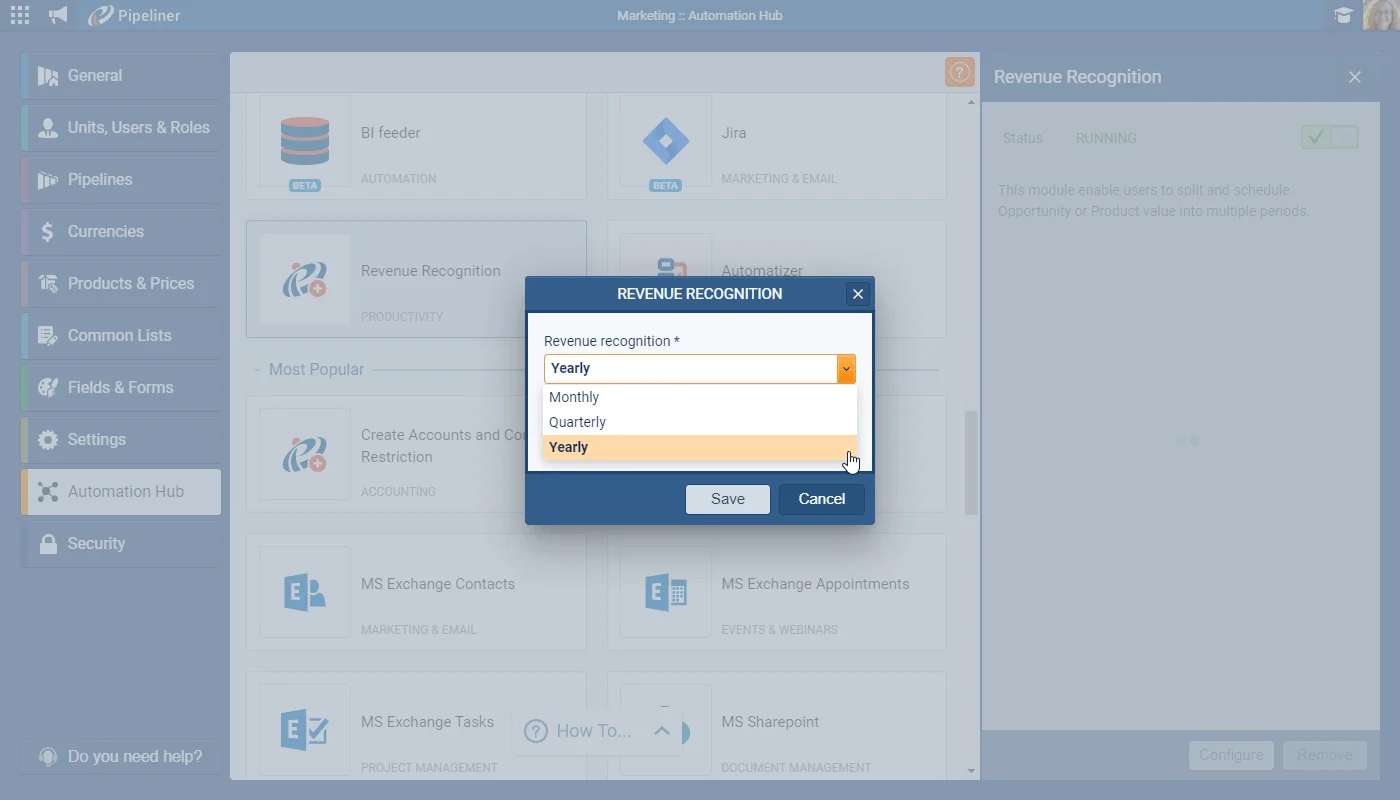
Revenue Recognition lets Business & Enterprise customers schedule revenue Monthly, Quarterly, or Yearly — recognising each year of a multi-year contract, or a machine at deal close with its service agreement spread over each quarter — and surfaces it through four new fields in List View and Reports.

01New · Pipeline

Revenue Recognition

Revenue Recognition

Many of our customers need to forecast their projected revenue, and also account for their confirmed income, over different time periods and not just as a single value based on the closing date.

You may sell a single multi-year contract and need to recognize each year’s revenue individually in your forecast projections. Or perhaps your business includes the sale of equipment or machinery along with a quarterly service agreement and you need to account for the machine immediately the deal closes but the service agreements should be recognized over each quarter. These are some examples where our new Revenue Recognition will help take your revenue projections and cash flow reporting to the next level!

Revenue Recognition is available for our Business & Enterprise tier customers and can be enabled by your Coevera Admins in the Automation Hub. Once running, you can enable Revenue Recognition individually for all of your opportunities in Coevera.

  1. Recognized revenue (total) — this is the total of the scheduled revenue for the opportunity.
  2. Recognized revenue (achieved) — this is the total revenue already recognized to date.
  3. Recognized revenue duration — this is the whole time period over which the revenue will be recognized.
  4. Recognized revenue in the target period — this is how much revenue will be recognized during the period I have selected in my Target.

All screenshots

5
DocumentationDocumentation#revenue-recognition
02New · Pipeline

Product Line Items

Product Line Items

In another major enhancement to Coevera, we have added the ability to add information to an Opportunity’s Products “on the fly” using custom fields. You can now, for example, add your warranty to an Opportunity and select the start date or add your machine model and then pick the colour!

This enhancement will totally revolutionise the way our customers can use Products within Opportunities!

Add Products from the Product Catalog to Opportunities as before but, once added, you can now click on each Product and add additional, line-item specific information to each one. Click on the “Product Name” to open the Product Line Item dialog to add extra information about this product. You can choose to add these custom fields to your Product List View. Use these newly created custom fields in Office 365 Word and Google Docs templates as well as in Pandadoc templates if you use our Pandadoc integration.

All screenshots

5
Documentation#product-line-items
03New · Integrations

Google Forms (Web Forms) Add-in

Google Forms Web Forms Add in

The brand new Coevera Google Forms Add-On allows you to quickly capture sales leads, contacts or accounts directly into Coevera when a form is submitted by email, via a link or from a website.

For example, you might want to create a registration form for an event, or an online “Contact Me” form. When somebody completes and submits the Google Form, the Coevera Forms Add-On will create a new record with the data in Coevera. The Add-on lets you link the options in those forms with the fields from a Coevera Lead, Account or Contact record and assign the Owner for the newly created records.

All screenshots

3
Documentation#google-forms-web-forms-add-in
04New

Administration Updates

The Coevera Administration Module now comes powered with a “How To” Help Widget. The widget delivers Articles and Videos to help you understand and manage every section of the Administration Module. In addition, you can submit a support ticket for help with any issues you are experiencing. In order to access the “How to” Help Widget, please click it at the bottom of any page within Coevera Administration.

#administration-updates

Various Improvements

Various ImprovementsPipeline
Hide Target

A Toggle Target Visibility option in the Power Panel controls whether the target calculation displays in front of or behind Won Opportunities, and creating and updating records — including Automatizer scheduled and manual processes — now runs up to 5× faster.

All screenshots

2
#various-improvements

Frequently Asked Questions

It lets you forecast projected revenue and account for confirmed income across different time periods rather than as a single value based on the closing date. It is available for Business & Enterprise customers and can schedule revenue Monthly, Quarterly, or Yearly.

Your Coevera Admins enable it in the Automation Hub; once it is running, you can enable it individually for each of your opportunities.

Four — Recognized revenue (total), Recognized revenue (achieved), Recognized revenue duration, and Recognized revenue in the target period — accessible in List View and Reports.

They let you add line-item-specific custom fields to the products on an opportunity on the fly — for example a warranty start date or a machine's model and colour — and reuse those fields in Office 365 Word, Google Docs, and Pandadoc templates.

It captures leads, contacts, or accounts into Coevera when a Google Form is submitted by email, via a link, or from a website, mapping the form options to fields on a Lead, Account, or Contact record and assigning the owner of the new records.

It is a contextual widget in the Administration Module that delivers articles and videos for each section and lets you submit a support ticket from any Administration page.

See it in your own pipeline

Start a free trial and explore what's new in Coevera 3.4.0 for yourself.

Keine Kreditkarte erforderlich · 14 Tage kostenlos testen

groupsTrusted by clients around the globeverified_userISO 27001 CertifiedshieldGDPR CompliantblockData never used to train AI