Every sales team starts with a list of contacts. The problem is what happens next. Names go stale, notes live in five places, and when the person who owned a relationship leaves, the account context walks out with them. Contact management software fixes that by keeping every contact, conversation, and account relationship in one place your team will actually use. The hard part is picking the tool that fits how you sell, not the one with the longest feature list.
The best contact management software in 2026 depends on team size and how much relationship detail you track. The short version: Coevera for B2B teams that need visual contact and relationship mapping, HubSpot for a free starting point, Nimble for relationship-first contact management, Pipedrive for a simple visual pipeline, and Copper for Gmail-native teams. The full ranking, with who each one fits, is below.
How to choose contact management software
Answer three questions before you compare prices. First, how big is your team, and how many contacts do you manage? Second, do you need to map relationships inside an account (who reports to whom, who influences the deal), or just keep clean records and history? Third, where does your team already work? A tool that lives inside Gmail or Outlook gets adopted faster than one your reps have to remember to open. Answer those, then read the list below against your answers.
Best contact management software at a glance
Prices are directional, billed annually, and were checked in July 2026. Confirm on each vendor's live pricing page before you sign.
| Tool | Best for | Starts at (user/mo) | Free plan | Standout |
|---|---|---|---|---|
| Coevera | Best for B2B sales organizations with a defined sales process | ~$85 (min. 15 users) | No (14-day trial) | Visual org charts and relationship mapping |
| HubSpot | Free starting point | ~$20 | Yes (2 users) | Full free CRM with contact records |
| Zoho CRM | Value as you scale | ~$14; Zia AI on higher paid tiers | Yes (3 users) | Deep features, Zia AI |
| Nimble | Relationship-first contacts | ~$25 | No (14-day trial) | Unified contact and social profiles |
| Pipedrive | Simple visual pipeline | ~$14 | No | Easy setup, clean deal view |
| Freshsales | Ease of use | ~$9; Freddy AI from ~$39 | Yes (3 users) | Built-in phone and email, Freddy AI |
| Salesflare | Automated data entry | ~$29 | No | Auto-logs emails, meetings, contacts |
| Copper | Gmail-native teams | ~$23 | No (14-day trial) | Lives inside Google Workspace |
| Insightly | Contacts plus projects | ~$29 | No (14-day trial) | CRM and project delivery together |
| Less Annoying CRM | Very small teams | ~$15 | No (30-day trial) | One flat price, all features |
How we evaluated
We scored each tool on five things that predict success, not just signup: how clearly it organizes contacts and accounts, how well it captures relationships, ease of data entry and adoption, total cost of ownership, and fit for B2B selling. The order reflects fit for mid-market B2B teams, which is the largest group of buyers, but each entry says exactly who it suits.
One disclosure, so you can weigh the ranking properly: Coevera publishes this guide and ranks its own product first. Every price and capability below is taken from the vendor's own public pricing page, and Coevera's watch-outs — no free plan, a 15-user minimum, and a paid agentic AI add-on — are listed in the same place as everyone else's. Check the figures yourself before you buy anything, including ours.
1. Coevera: best overall for B2B
Coevera tops the list because it treats contact management as relationship management, not a spreadsheet with better fonts. Reps see every contact inside an account through visual org charts and relationship maps, with a traffic-light system for relationship strength and influence mapping to surface the real decision-makers. Accounts, contacts, opportunities, and activities live in one connected view instead of disconnected lists. Voyager AI adds assistive help on every plan, and its agentic tier works with approval-based autonomy, meaning it shows its reasoning and asks before it acts. Competitors have AI too, so the difference is transparency, not just capability.
Where it fits: B2B sales organizations of 15 to 2,500 sellers that sell into accounts with multiple stakeholders. Watch-outs: no permanently free plan, the agentic AI tier is a paid add-on, and every plan starts at 15 users, so the floor is about $1,275 per month — smaller teams are handled case by case. Pricing starts around $85 per user per month billed annually, with a 14-day free trial. See the pricing page for tiers. For the wider CRM picture, see our best CRM for B2B sales teams guide.
2. HubSpot: best free starting point
HubSpot's free CRM is the easiest way to start managing contacts without a budget. You get contact records, activity history, and email tracking, and its Breeze AI spans an assistant and autonomous agents as you grow.
Where it fits: teams that want a free on-ramp and may add marketing tools later. Watch-outs: cost climbs fast once you need paid features, with the Professional tier around $100 per seat per month plus roughly $1,500 onboarding. Paid plans start around $20 per seat per month.
3. Zoho CRM: best value as you scale
Zoho CRM offers a deep feature set for the money, with Zia AI for an assistant and agent tooling, and a free plan for up to three users. It is strongest if you already use other Zoho apps. Very small teams can also look at Bigin by Zoho, a lighter pipeline CRM that starts around $7 per user per month.
Where it fits: budget-conscious teams and the Zoho ecosystem. Watch-outs: the breadth can feel busy and may need configuration time, and the AI is not in the entry plan. Paid plans start around $14 per user per month billed annually, but Zia's scoring, prediction, and Ask Zia assistant are not included at that entry price, and the tier each one requires varies.
4. Nimble: best for relationship-first contacts
Nimble is built around people rather than deals. It pulls contact details and social profiles into one unified record, which suits founders, consultants, and teams whose business runs on relationships. Its single Business plan keeps pricing simple.
Where it fits: relationship-driven teams that want rich contact profiles without tier-shopping. Watch-outs: one plan holds up to 25,000 contacts, and there is no free tier. Pricing is around $25 per user per month billed annually, with a 14-day trial.
5. Pipedrive: best for a simple visual pipeline
Pipedrive is the fastest way to get a clean visual pipeline running, and its contact records sit right alongside deals. It is easy to learn and inexpensive to start.
Where it fits: small teams that want simple contact and deal management in one view. Watch-outs: no free plan, and its AI is assistive. Pricing starts around $14 per user per month, with mid tiers near $39 to $59.
6. Freshsales: best for ease of use
Freshsales offers a clean interface with built-in phone and email and Freddy AI for an assistant, plus a free tier for up to three users. Contact and account records are easy to navigate.
Where it fits: small teams that want communication tools inside an easy CRM. Watch-outs: confirm the rate, as sources vary. Paid plans start around $9 per user per month billed annually (about $11 billed monthly).
7. Salesflare: best for automated data entry
Salesflare auto-logs emails, meetings, and contact details, so small B2B teams in Gmail or Outlook spend far less time on manual entry. It builds contact records for you and keeps them current.
Where it fits: small, automation-minded B2B teams tired of updating fields by hand. Watch-outs: no free plan, and pricing starts around $29 per user per month. Its AI is assistive rather than agentic.
8. Copper: best for Gmail-native teams
Copper lives inside Google Workspace, so contacts, emails, and tasks appear right in Gmail with no separate app to open. That native fit drives adoption for teams that already run on Google.
Where it fits: Google Workspace teams that want CRM where they already work. Watch-outs: the entry Basic plan does not include sales opportunities, so deal tracking needs the Professional plan (around $59 per seat per month). Pricing starts around $23 per seat per month billed annually, with a 14-day trial.
9. Insightly: best for contacts plus projects
Insightly links contact management to project delivery, so the same record that closes a deal can carry it into onboarding. That makes it useful for teams that sell and then deliver a service.
Where it fits: teams that need CRM and lightweight project management together. Watch-outs: there is no free plan. Pricing starts around $29 per user per month billed annually, charged per user, with a Professional tier near $49. (The "two users included" figure you may see belongs to Insightly's All-in-One bundle, not the entry CRM plan.)
10. Less Annoying CRM: best for very small teams
Less Annoying CRM does what its name promises: one flat price, every feature included, and a short learning curve. For a solo operator or a handful of users, it removes the tier math entirely.
Where it fits: solo operators and small teams that want simple contact tracking. Watch-outs: it is not built for complex B2B pipelines or agentic AI. Pricing is a flat $15 per user per month, with a 30-day free trial.
See contacts as relationships, not rows
Try Coevera free for 14 days. No credit card required.
Start free trial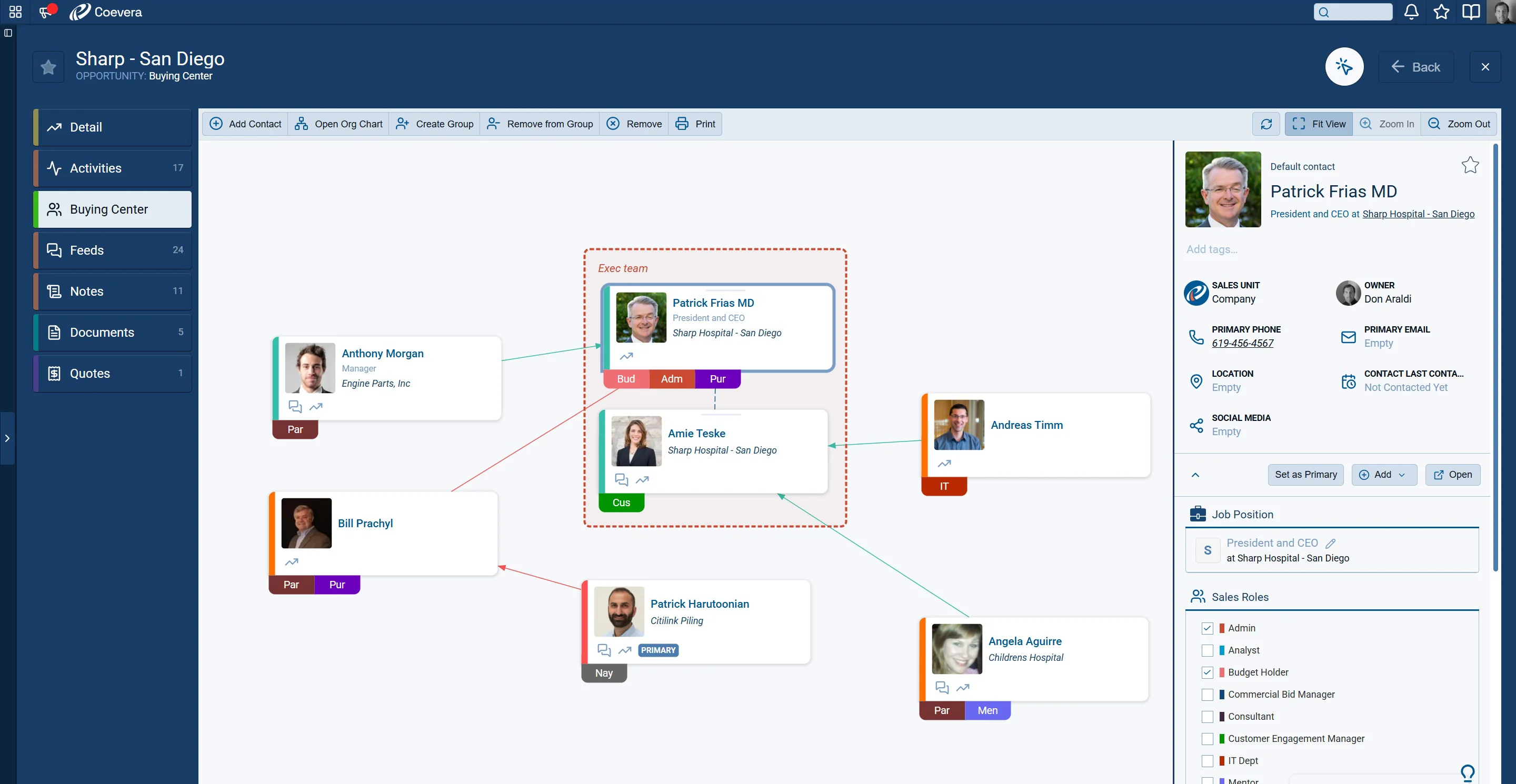
How to pilot before you buy
Whatever your shortlist, a short pilot is the surest way to choose, because clean data and daily use decide the winner. Shortlist two or three tools that fit your team, then run each for two weeks with real contacts and a few live accounts.
- Import real contacts
Use a live segment of your list, not sample data, so you feel how the tool handles duplicates and messy records.
- Watch unprompted updates
The best signal is whether reps update contacts without being told. That predicts adoption better than any feature checklist.
- Total the real cost
Add storage, enrichment, and AI tiers to the per-seat price, then compare the three-year cost before deciding.
Clean contact data is what makes any of these tools pay off.